


Table of contents
- Why do you need a work intelligence program?
- Start with business outcomes, not workforce data
- The 3 factors that shape a successful work intelligence program
- Get your work data ready for action
- Turn workforce insights into measurable goals
- Create an executive scorecard for accountability
- Establish a repeatable rhythm for reviewing progress
- Avoid common work intelligence program mistakes
- Build a work intelligence program that drives action
You have behavioral work data. You see opportunities to improve productivity, capacity and AI adoption. So why isn’t anything changing?
Work intelligence programs don’t stall because of technology. They struggle to get off the ground when leadership fails to decide how insight should flow through the organization — and land in a system that wasn’t designed intentionally.
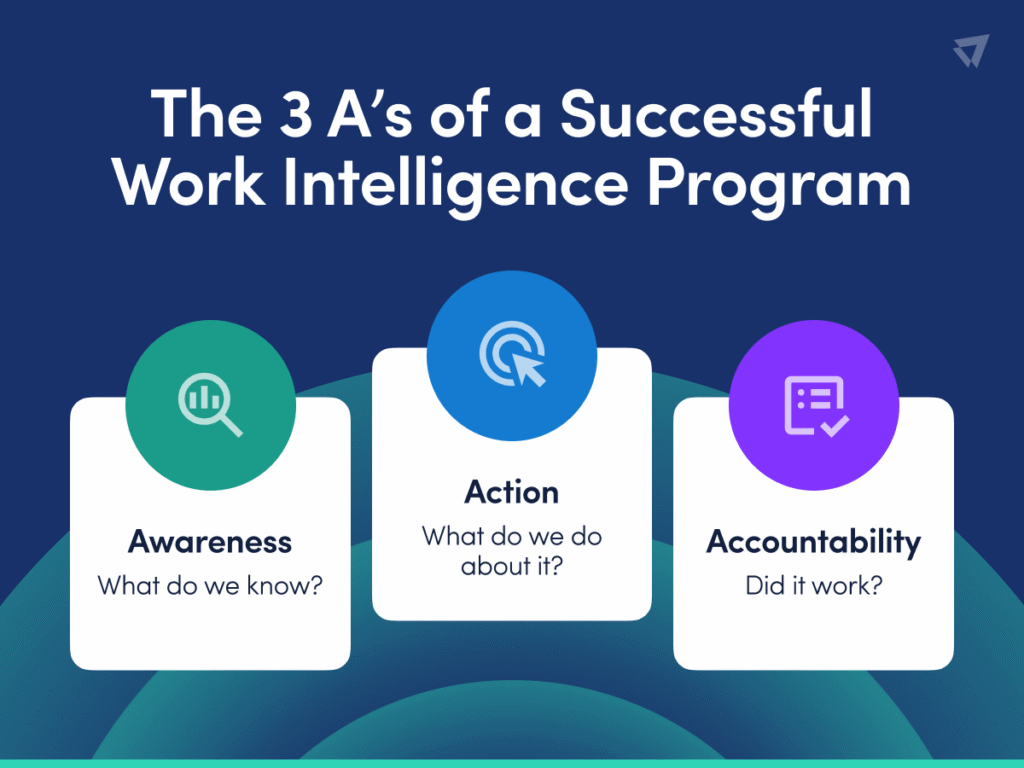
Turning workforce insights into measurable results requires more than dashboards. Leaders must make critical decisions related to three dimensions: action, awareness and intelligence.
Why do you need a work intelligence program?
A work intelligence program is a clearly defined process for putting insights into the hands of the right people and holding someone accountable for what happens next. It requires an organizational approach to using workforce data to understand how work gets done, identify opportunities for improvement and drive measurable changes in performance. It’s
Start with business outcomes, not workforce data
A successful work intelligence program starts with the business outcomes you want to improve, rather than the technology collecting the data.
This shift makes work intelligence relevant across the enterprise, empowering different leaders to use the same data to answer different questions. A CFO can identify opportunities to improve capacity and resource allocation while the CHRO focuses on workload and coaching. While a CIO prioritizes technology investments and AI adoption, the COO looks for ways to improve productivity and operational efficiency.
This shift moves the conversation from tools to outcomes, with action as the common thread. Rather than collecting more data and adding dashboards, the goal is to provide leaders with the visibility they need to make better decisions.
How to shift the conversation from tools to outcomes
| Instead of: | Focus on: |
|---|---|
| Monitoring activity What are employees doing? | Improving performance Where are the opportunities to help teams work more effectively? |
| Collecting workforce data What information do we have? | Making better decisions What does the data tell us to do differently? |
| Reporting productivity metrics What do the dashboards show? | Driving measurable improvement What outcome are we trying to change? |
| Tracking technology usage Are employees using our tools? | Optimizing technology investments Are our tools helping employees work more effectively? |
| Measuring AI adoption Who’s using AI? | Creating value from AI Where is AI changing how work gets done and where are there opportunities to improve adoption? |
The 3 factors that shape a successful work intelligence program
Before the data does anything, leadership must make three decisions about how work intelligence flows through the organization. Each one is a deliberate design choice that guides how insights move from data to decisions and, ultimately, action.
Awareness
What are we trying to understand?
Organizations need to understand how employees spend their time, where productivity and capacity stand and which activities contribute to business outcomes. Work intelligence helps leaders identify opportunities to improve performance, efficiency and AI adoption.
- In a transparent approach, employees are aware of the program, understand how workforce data supports broader goals and have access to their own insights. This option offers the greatest level of transparency.
- In a semitransparent approach, employees know the program exists and understand what it measures but don’t have individual access to the data. This middle-ground approach provides greater transparency while keeping access controlled.
- In a silent approach, leadership and admins know about the program while employees are unaware. This approach offers more control but less transparency.
Whichever approach you choose, make communication intentional. For example, talking about improving performance explains what you’re trying to accomplish and how workforce insights support those goals.
Action
What do we do about it, and who’s responsible for driving change?
Next, decide who owns converting workforce insights into measurable improvements.
Some organizations put decisions in the hands of managers while others rely on a centralized team or center of excellence (COE). A successful strategy involves three steps.
- Prioritize: Focus on the highest-value opportunities to increase productivity, optimize capacity or reduce unnecessary costs.
- Intervene: Depending on the opportunity this might mean reskilling employees, redistributing workloads, streamlining processes or introducing AI and automation to reduce repetitive work.
- Scale: Expand improvements that deliver results to other teams, departments and workflows.
How you put these actions into practice depends on your organization’s operating model.
In a manager-led hub-and-spoke model, managers own goals and action for their teams while a central hub helps set goals, provide guidance and maintain consistency across the organization. This model supports a more transparent approach.
In a centralized COE model, a center of excellence owns the program, identifies opportunities and works with leaders and managers to drive change. This model operates with more controlled visibility.
Whichever approach you choose, make ownership explicit. The biggest risk is choosing neither — collecting workforce insights without assigning anyone to act on them. Without clear accountability, valuable data is likely to remain on a dashboard instead of driving change.
Accountability
Who’s accountable for driving change, and how do we know it worked?
Lastly, determine how you’ll measure the impact of your actions and demonstrate whether they’ve delivered the intended results. Focus on three essential components:
- Baseline: Document current performance before making changes so you have a reliable point of comparison. This might include productive hours, healthy utilization, technology adoption or other metrics tied to your business priorities.
- Measure: Track performance against your baseline and target to determine whether an intervention is producing the expected improvement. Look for meaningful trends rather than a single snapshot of workforce activity.
- Prove: Translate changes in workforce metrics into outcomes leaders care about, such as increased capacity, reduced costs, greater operational efficiency or measurable returns from AI investments.
The goal is to give people the insights they need to make decisions without overwhelming them with data they don’t use.
Generally speaking, the closer you get to day-to-day work, to more specific the access:
- Admins and stakeholders need full access to configure the program and manage underlying data.
- Executives and functional leaders need dashboards and reports tied to the business outcomes they own.
- Managers need team-level insights to identify opportunities, guide coaching and take action directly.
- Employees may benefit from personal insights for visibility into their own work, depending on your awareness strategy and operating model.
Your approach to access should reinforce how you’ve chosen to drive change. In a centralized COE model, dashboard access may stay primarily with leaders and the COE. In a manager-led hub-and-spoke model, access typically extends to managers and, in more transparent programs, employees.
The key is flexibility. Give each audience enough visibility to act while keeping access aligned with their role, responsibilities and your broader program goals.
Once you’ve made these decisions, you have the foundation for your work intelligence program. Next, prepare your workforce data so leaders have reliable insights to act on.
Get your work data ready for action
Before setting goals for your work intelligence program, leadership must take steps to ensure the behavioral data you collect accurately reflects how work gets done. This step is especially critical at the large enterprise, where hundreds of roles use thousands of websites and applications differently.
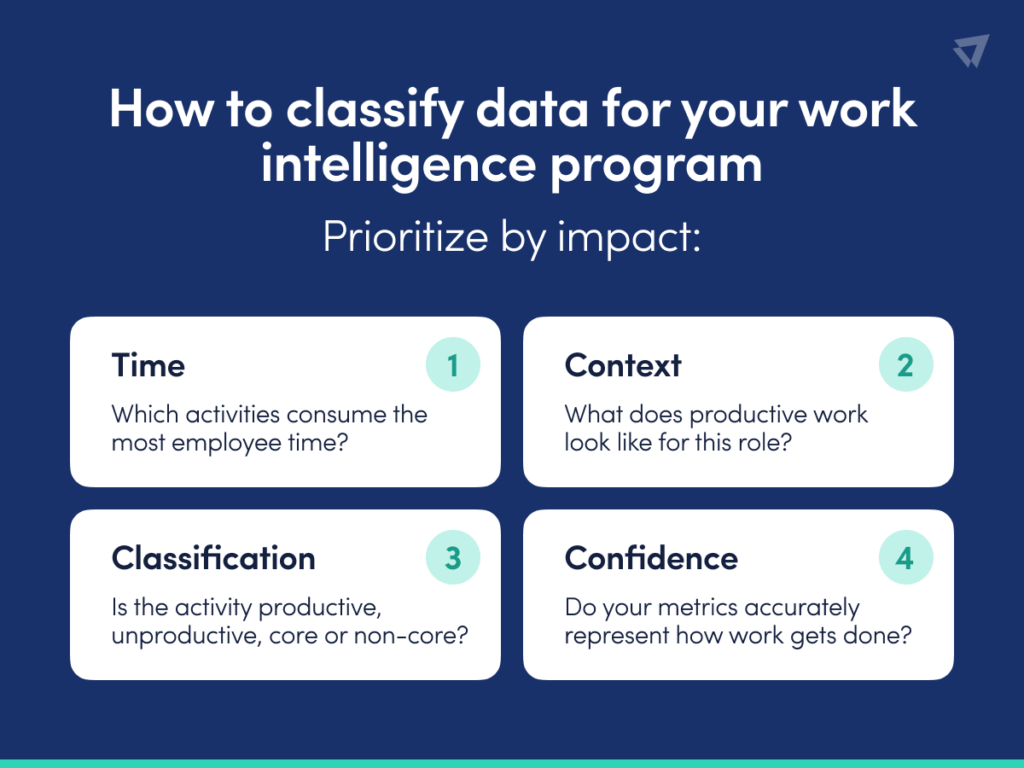
The answer is not to classify everything. Instead, prioritize activities that account for the most time and have the greatest influence on your metrics. Start with high-volume activities, determine whether they’re productive or unproductive for each relevant role and establish a threshold for what warrants attention. An activity used for only a few seconds over 30 days probably doesn’t deserve the same scrutiny as one consuming hours of employee time.
How to classify data for your work intelligence program
More classifications don’t automatically mean better workforce insights. A few seconds of activity over 30 days isn’t worth the same attention as an activity consuming hours of employee time. When classifying your data, focus on the activities that directly impact your metrics:
- Start with high-volume activities. Focus on activities accounting for the greatest amount of employee time.
- Add role context. Work with role champions to determine what productive, unproductive, core and non-core work looks like for different jobs.
- Set a threshold. Avoid spending resources on analyzing low-volume activities with little-to-no effect on results.
- Watch for changes. If your metrics change after you update classifications, make sure the shift reflects actual employee behavior — not just how the data is categorized.
Once you have confidence in your workforce data, the next step is deciding what you want to change.
Turn workforce insights into measurable goals
Dashboards show where productivity, capacity and technology adoption stand today. The next step is defining where you want to go — and setting a target, timeline and owner to get there. Use ActivTrak’s four-step cycle to move from understanding current performance to driving measurable improvement.
1. Assess your baseline
Start with your current state. Identify the metric you want to improve and establish a baseline so you have a clear point of comparison. Focus on opportunities tied to a business priority rather than trying to improve every metric at once.
2. Align on the goal
Define what improvement looks like and when you expect to achieve it. Make the target specific enough to measure progress over time. For example, suppose a 500-person department has 66% healthy utilization. Leadership might set a goal of reaching 80% by year-end, providing a measurable outcome rather than a general directive to improve capacity.
3. Execute with clear accountability
Assign an owner to the goal based on the operating model you chose. In a manager-led model, managers own improvement for their teams with support from the program hub. In a centralized model, the COE tracks the opportunity and works with business leaders to drive change. Either way, someone needs to own the next step.
4. Measure the impact
Track progress against your baseline and target at regular intervals. If healthy utilization moves from 66% to 72%, for example, you have evidence of improvement along with a clear view of remaining opportunity. Use these reviews to understand what’s working, where progress has slowed and what actions to take next. Then repeat the cycle as priorities and workforce needs evolve.
Create an executive scorecard for accountability
Setting goals is only the beginning. To drive change, leaders need a consistent way to see whether the organization is progressing toward them. An executive scorecard brings those pieces together. For each priority, capture the baseline, target, current performance, trend and accountable owner. This gives leaders a quick view of progress without requiring anyone to dig through detailed workforce data.
Consider the common goal of healthy utilization, which happens when team members stay within a set goal for daily productive hours and work-life balance. If a department starts at 66% healthy utilization and the year-end target is 80%, the scorecard makes progress against that goal visible over time. If healthy utilization reaches 72%, leaders see both the improvement and the remaining opportunity.
What to include in your executive scorecard
Keep the scorecard focused on the information leaders need to make decisions and hold owners accountable:
- Business priority: What outcome are you trying to improve?
- Baseline: Where did you start?
- Target: What does success look like?
- Current performance: Where are you now?
- Trend: Are you moving in the right direction?
- Owner: Who’s accountable for driving improvement?
- Status: Is the goal on track or does it need attention?
The goal isn’t to report every workforce metric. It’s to create a shared view of the outcomes that matter, then use that view to guide decisions and follow through.
Sample executive scorecard
| Business Priority | Metric | Baseline | Target | Current | Trend | Owner | Status |
| Improve workforce capacity | Healthy utilization | 66% | 80% by year-end | 72% | Improving | Chief Operating Officer (COO) | On track |
| Advance AI adoption maturity | Employees at stage 2 | 12% | 25% by year-end | 11% | Declining | Chief AI Officer (CAIO) | Needs attention |
| Free up workforce capacity | Hours of reclaimable capacity per month | 2,400 hrs | Reclaim 30% by year’s end | 2,050 hrs | Improving | Chief Financial Officer (CFO) | On track |
| Optimize SaaS spend | Unused software licenses | 22% | <10% by year-end | 24% | Declining | Chief Information Officer (CIO) | Needs attention |
Establish a repeatable rhythm for reviewing progress
Once goals and owners are in place, you need a consistent rhythm for reviewing work intelligence program progress, addressing roadblocks and deciding what happens next. A quarterly planning cycle paired with monthly progress reviews gives leaders enough time to see meaningful trends while keeping goals visible throughout the quarter.
Set priorities quarterly
At the beginning of each quarter, use workforce analytics to identify the opportunities that matter most. Review your baseline, determine where improvement would have the greatest business impact and align on the goals you’ll prioritize.
For each goal, define the target, timeline and accountable owner. This is also the time to revisit existing goals and adjust priorities as business needs change.
Review progress monthly
Don’t wait until the end of the quarter to find out whether you’re on track. Use monthly reviews to compare current performance with your baseline and target.
Your scorecard keeps these conversations focused. Look at which metrics are improving, which have stalled and where leaders need to investigate further. Then identify the actions required to keep progress moving.
Monthly reviews also create an opportunity to share what’s working. If one team improves capacity, productivity or technology adoption, dig into what changed and determine whether those practices apply elsewhere.
Refine the program as you go
Workforce data needs context, and that context evolves. Continue working with managers and role champions to validate classifications, account for changes in how teams work and make sure your metrics remain meaningful.
The same applies to your goals. As you learn what drives improvement, refine your targets and areas of focus. Over time, this repeatable rhythm turns work intelligence from a reporting exercise into an ongoing management practice.
Avoid common work intelligence program mistakes
Even with the right behavioral work data, a work intelligence program may fall short if the processes around it aren’t clearly defined. These common mistakes often point to a gap in program design.
Treating the technology as the program
Implementing a workforce analytics platform gives you visibility, but it doesn’t dictate what your organization does with that visibility. This is why it’s so important to start with the business outcomes you want to improve before building the accountability and operating processes needed to get there.
Collecting data without setting goals
A dashboard may highlight an opportunity, but knowing where you stand isn’t the same as knowing where you’re going. Instead, establish a baseline, define a measurable target and set a timeline for reaching it.
Leaving accountability unclear
When everyone has access to an insight but no one owns the outcome, action is likely to fall through the cracks. Choose an operating model and explicitly assign responsibility for driving improvement.
Giving everyone the same access
Different stakeholders use workforce insights for different decisions. More data isn’t always more useful. Give executives, functional leaders, managers and program owners the level of insight they need to take action.
Trying to classify everything
Spending time categorizing every application and website creates unnecessary work without necessarily improving the quality of your insights. Focus on prioritizing activities that account for the most employee time and have the greatest impact on your metrics.
Overlooking role context
The same activity may support productive work for one role but not another. Applying classifications without context makes your metrics less meaningful. Involve managers, role champions or liaisons who understand how work gets done for different teams.
Confusing updates with performance changes
Updating classifications may shift your productivity metrics even when employee behavior hasn’t changed. When you see a change in performance, check whether it reflects how people are working differently or how the data is categorized.
Build a work intelligence program that drives action
The technology behind work intelligence matters. But technology alone doesn’t determine whether workforce insights lead to better business outcomes. That depends on the program you build around the data.
When all components work together, work data is more than something leaders review — it’s a way to identify opportunities, take action and measure whether those actions are working.
Ready to turn your work data into measurable results? Request a demo to see how ActivTrak gives leaders the workforce insights they need to make better decisions and drive measurable improvement.