


(This is part eight of a series.)
In part seven of this series, we looked at the latest remote work benchmarks.
Next, it’s time to review in-office and hybrid work patterns. Why? Because while 47% of organizations operate as remote-first, the other half run on one or both of these other models. That means millions of employees still spend at least part of their week working on-site, making it just as important to understand how they impact productivity.
A quick note on format: This section of the companion guide is structured a little differently. Rather than answering multiple questions, we’ll focus on one key finding and show you how to drill down further to get the full picture with your ActivTrak data.
(Reminder: If you’re new to ActivTrak, sign up for a free trial to collect data and access Professional features for 14 days.)
Is your organization predominantly office-first or regular hybrid?
The finding: Office-first and hybrid organizations now represent half of all workforce models.
One-quarter of organizations operate as office-first, and 25% follow a regular hybrid model. While remote-first work receives much of the attention, hybrid and in-office environments continue to play a major role in how work gets done.
Why it matters: Knowing your model is the start. Understanding how it shapes performance is what drives better decisions.
While many leaders still wrestle with the return-to-office question, the more important thing to ask yourself is whether your operating model gives employees what they need to do their best work. Your ActivTrak data helps you answer questions like:
- How do productivity and utilization metrics differ across work locations?
- What are the real tradeoffs between remote, hybrid and in-office work at your organization?
How to compare your data: Use ActivTrak’s Productivity by Location dashboard (available on the Professional plan).
- Navigate to Productivity Optimization > Productivity by Location.
- Change Activity Date to “Last 180 Days.”
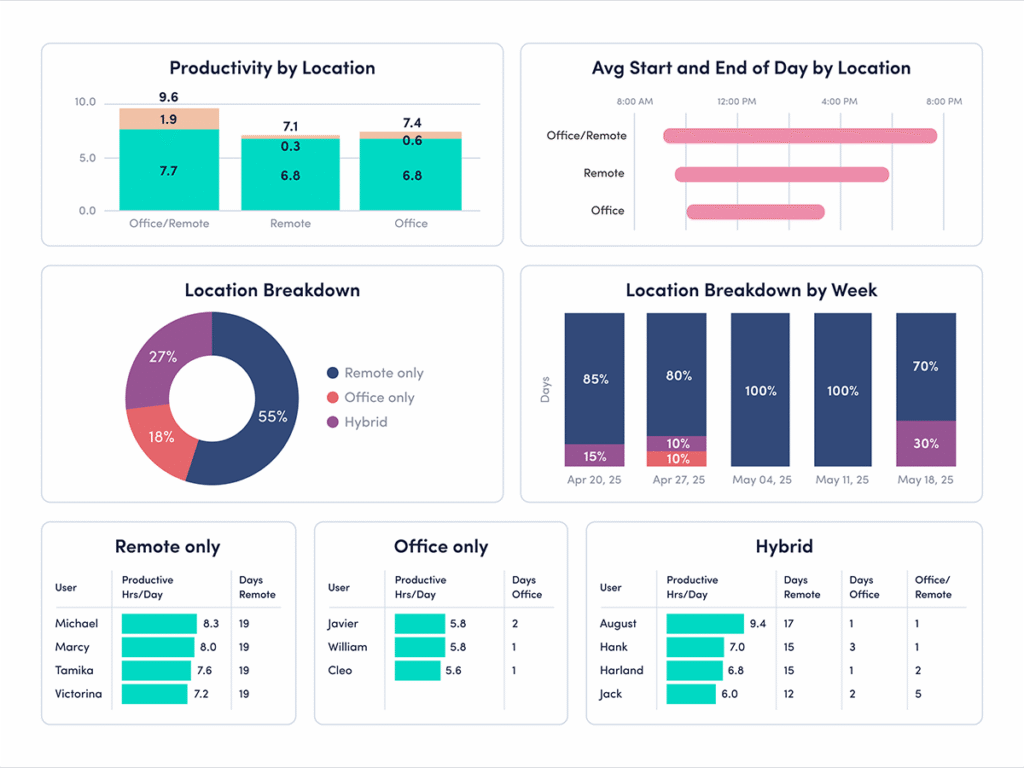
Next, let’s look at how productivity and work patterns vary between in-office and hybrid employees — and what those differences may tell you.
How to interpret the data for in-office environments
Looking at your overall work model is a good starting point, but the real insights come from drilling down deeper. Here’s what the data says about office-first and office-only employees, and where to look next.
The finding: Office-first companies have the highest share of underutilized employees at 20%.
How to compare your ActivTrak data: If your organization leans office-first, this is one of the most important numbers to cross-reference. Underutilization may signal disengagement, and disengagement has a real cost. When employees consistently work below capacity, engagement and productivity decline. This is especially true for chronically underutilized employees, who spend more than 75% of their work year under-challenged and under-deployed.
Revisit part four to see if your employees are at or above the 20% underutilization benchmark. Pay particular attention to which teams or roles show the lowest utilization, since in-office environments may mask disengagement in ways remote setups often can’t. The goal isn’t just to increase activity — it’s to ensure employees have meaningful, balanced workloads that make full use of their skills and time.
The finding: Office-only workers have the highest focus efficiency at 64%.
How to compare your ActivTrak data: This benchmark suggests office environments may support focused work more effectively than many leaders assume. But focus efficiency doesn’t happen automatically. It’s shaped by factors like collaboration overload, multitasking and frequent interruptions.
Revisit part three to compare focus efficiency against collaboration and multitasking trends inside your organization. This helps you understand whether office employees work efficiently or spend more time navigating interruptions.
The finding: Office-only workers have the longest average productive sessions at 41 minutes.
How to compare your ActivTrak data: Long productive sessions indicate employees have uninterrupted time to concentrate and make meaningful progress. In-office employees currently lead in this area. To see how your organization compares to this benchmark, revisit part two.
Compare productive session length alongside meeting patterns, collaboration habits and workload balance to identify which conditions help employees stay focused longest — and how those conditions differ across work environments.
How to interpret the data for hybrid setups
Hybrid work looks different depending on how you measure it. The Productivity by Location dashboard shows you the surface-level split — but to understand what’s actually happening with your hybrid employees, you need to dig into the details. Two findings in particular are worth your attention.
The finding: Hybrid workers — those splitting a single day between office and remote — have the longest workdays at 9 hours 45 minutes.
How to compare your ActivTrak data: A longer workday doesn’t automatically mean teams get more done. It may signal more fragmentation: Employees start work in one environment, continue it in another and struggle to fully disconnect at the end of the day.
Revisit part two to compare workday length alongside productive time, start times and workload balance. This helps you identify whether longer hybrid workdays reflect healthy flexibility or overly heavy workloads.
The finding: Hybrid workers log the lowest productive time and focused hours of any location type.
How to compare your ActivTrak data: This is the finding that should prompt the most questions. Hybrid employees are working the longest days and getting the least focused work done — a combination that points to real friction. Splitting time between locations often means more meetings, more context-switching and less control over the workday.
Revisit part three to compare focus, productivity and collaboration across hybrid teams. Understanding where interruptions happen helps you create better structures for focused work, regardless of location.
Stay tuned for more State of the Workplace benchmarking insights
The data is clear: No single work model wins across every measure. Where your employees work shapes how they work, but location alone doesn’t explain performance. What matters more is whether the structure around your employees — the expectations, the workflows, the support systems — actually sets them up to do their best work.
This is what your ActivTrak data helps you see. Use it to move past assumptions and find out what’s really driving results across your workforce.
Did you miss part seven? Read it here.