


(This is part one of an ongoing series. Check here for weekly updates)
In part one of our State of the Workplace companion guide series, we look at the latest AI adoption trends.
In this guide, we help you answer three critical questions:
- How many AI tools do your teams use?
- What are the top, most-used AI tools?
- How much time do employees spend using each tool?
If you’re new to ActivTrak: Sign up for a free trial to gain full access to Professional features for 14 days. Then mark your calendar to come back and follow the steps in this guide after collecting data for several days.
If you have access to a paid ActivTrak plan: Let’s get started right now.
1. How many AI tools do your teams use?
The finding: AI tool sprawl is now the norm.
By early 2025, more than 95% of companies of all sizes — from small business to enterprise — had adopted AI to some degree. The average organization now uses 7 AI tools, up from just 2 in 2023, and 83% of organizations use 6 or more. In other words: It’s no longer a question of if your employees use AI, but how many AI tools they use.
Why it matters: More tools don’t mean more impact.
Instead of consolidating around a few trusted platforms, most organizations are experimenting with many. More than 90% apply AI to at least one business function, but only one-third use it to create new products or reinvent processes. And 37% still use AI at a surface level, with little change to how work gets done.
You need to understand how many AI tools your employees already use to lay the foundation for answering bigger questions such as:
- Which tools actually drive productivity?
- Where is time saved (or added)?
- How do you standardize usage across teams?
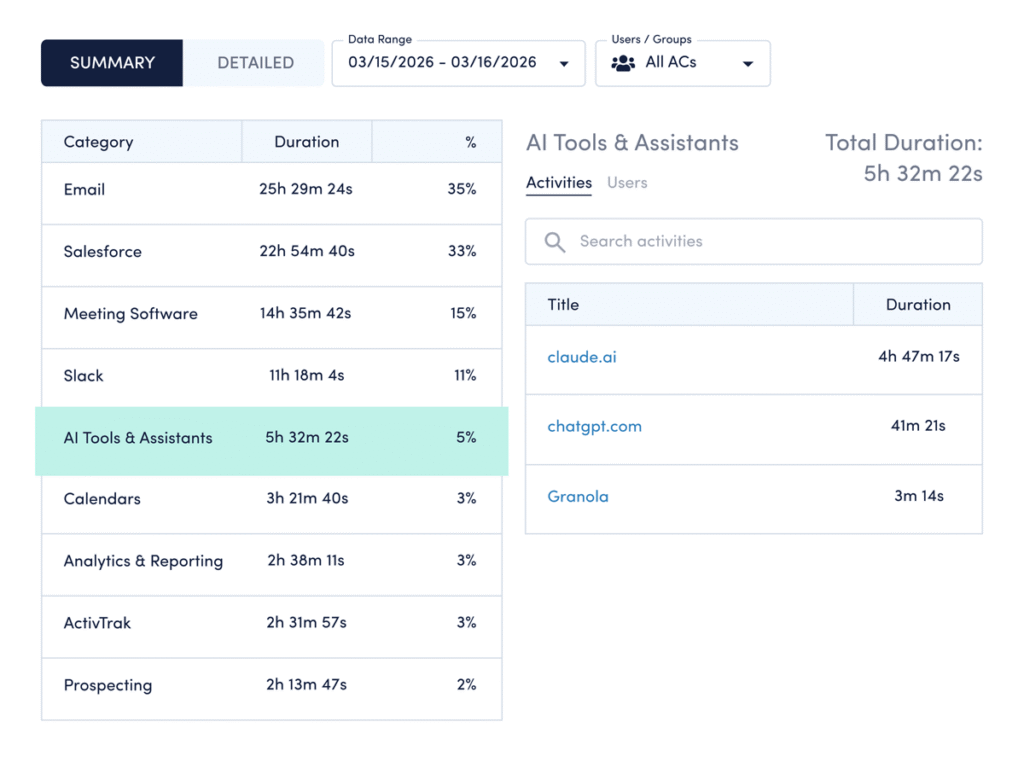
How to compare your data: Use ActivTrak’s Category Usage dashboard (available on all paid plans):
- Navigate to Technology & AI Usage > Category Usage.
- Select AI Tools & Assistants to pull up a list of tools your employees currently use.
How to interpret the data:
- If you see less than 6 AI tools: A low tool count can mean two things: You’re either in early experimentation, or you’ve deliberately narrowed your stack to what works. If it’s the former, focus on identifying high-value use cases before expanding. If it’s the latter, shift to deepening usage and measuring impact from the tools you have.
- If you see 6-7 tools: You’re aligned with the current benchmark. This means it’s time to build AI into day-to-day operations. Identify which tools drive value, then integrate them into workflows.
- If you see more than 7 tools: Your AI tool count is high. While this may indicate early adoption, there’s also a risk of inefficiencies caused by rapid tool sprawl. Look for opportunities to consolidate around platforms that show measurable impact. Identify where overlap exists, where tools lack clear ownership and which platforms actually drive impact.
2. What are the top most-used AI tools?
The finding: One tool dominates, but the market is fragmenting.
ChatGPT leads by a wide margin — used 27x more than the next most-used AI tool (Cursor). Chatgpt.com is also the fifth most-used business website, up from #19 in 2024, with a 145% year-over-year increase.
Why it matters: Usage patterns shape your AI strategy.
The tools your employees use most aren’t random. They signal where AI fits into workflows today and where governance needs to catch up. While 75% of CEOs say trusted AI is impossible without effective AI governance, only 39% have a good governance strategy in place today. Knowing which tools your teams use allows you to set clear policies for AI usage.
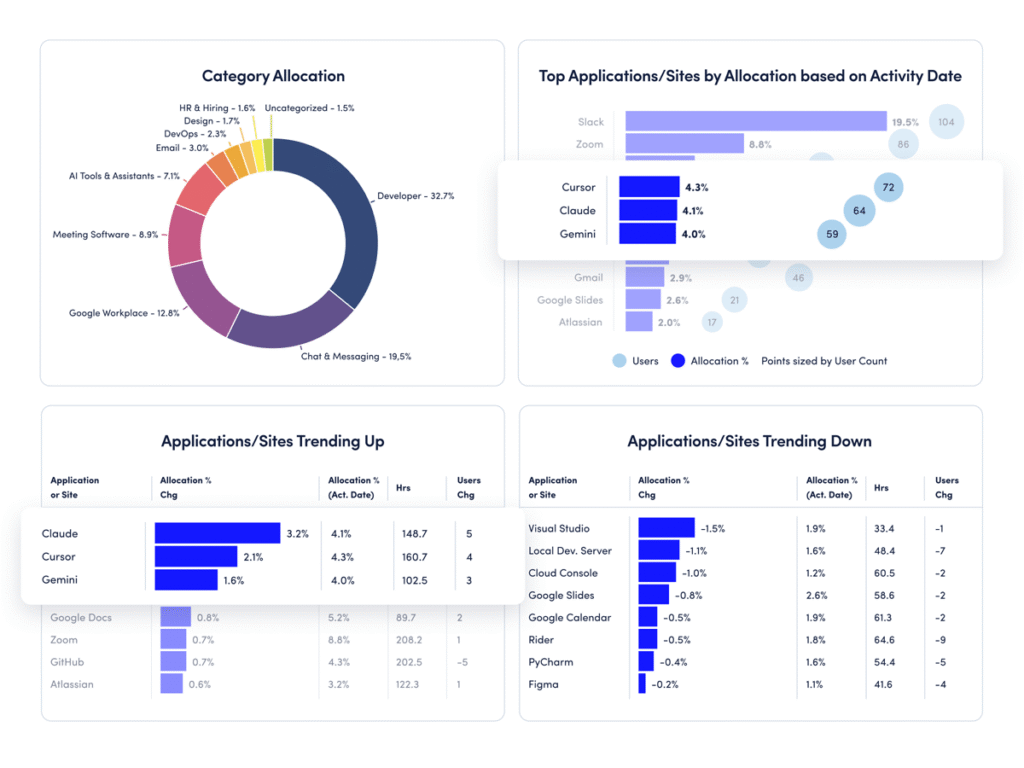
How to compare your data: Use ActivTrak’s Technology Utilization dashboard (available on the Professional plan):
- Navigate to Executive Summaries > Technology Utilization.
- View the “Top Applications/Sites by Allocation” report to identify most-used AI apps.
- Click “Top Changes” in the upper left to see AI tools trending up (and down).
How to interpret the data:
- If usage is concentrated in 1-3 tools: You have a clear starting point for standardization. Focus on formalizing how teams use these tools — define clear use cases, provide targeted training and set expectations for where AI fits into daily work.
- If usage is spread across many tools: This may limit consistency. Define preferred tools and set realistic productivity benchmarks tied to actual outcomes.
- If new tools appear frequently: Adoption is happening organically. It’s time to establish guardrails before experimentation solidifies into habits.
3. How much time do employees spend using each tool?
The finding: Most employees rarely use AI.
Despite rapid advancement, the reality is that the largest segment of AI users (57%) spend less than 1% of their total work time in AI tools. Only a small group has reached the productivity sweet spot — spending 7% to 10% of their time using AI.
Why it matters: Adoption without depth limits impact.
While most organizations have crossed the adoption threshold, few are operationalizing AI in meaningful ways. And this is where the real value lives. The data shows AI doesn’t reduce work — it amplifies it. So if most employees still spend less than 1% of their time in AI tools, you have untapped capacity sitting in plain sight.
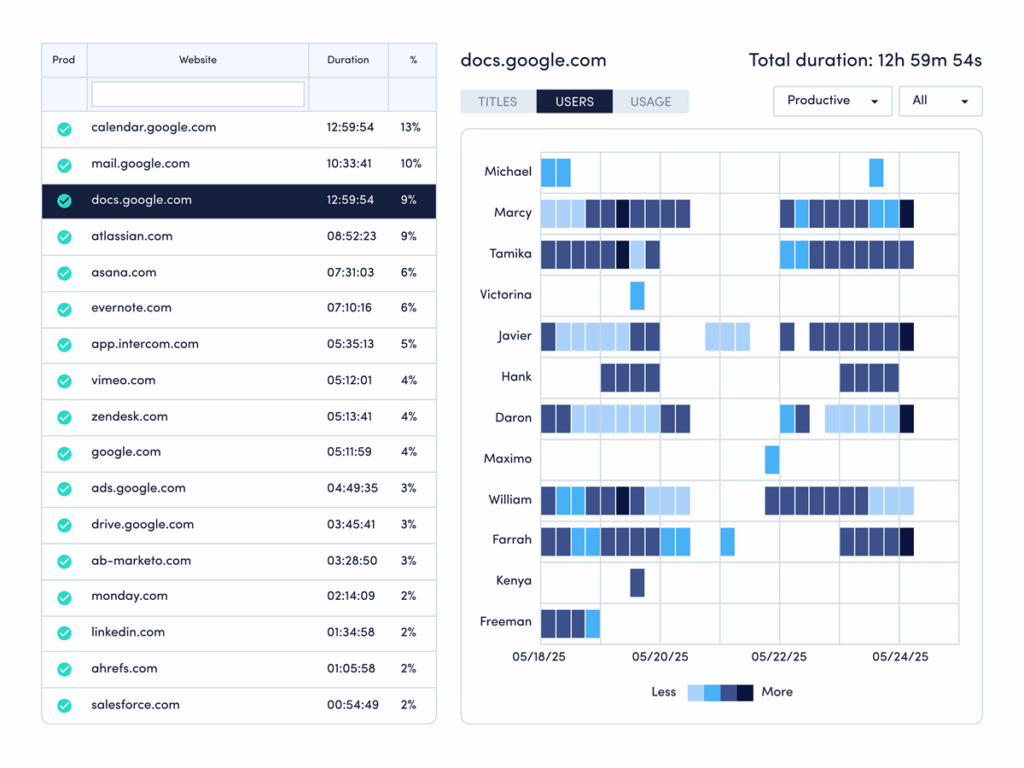
How to compare your data: Use ActivTrak’s Website Usage and Application Usage dashboards (available on all paid plans):
Earlier, we looked at how much time employees spend in AI tools. The next step is understanding where that time goes — and what it tells you about how work gets done.
- Navigate to Technology & AI Usage > Website Usage and Application Usage.
- Change the date range to the last 30 days.
- Note the percentage for each AI website or app.
How to interpret the data:
- If most employees are below 1%: You’re in early adoption. Focus on identifying repeatable use cases that save time.
- If employees are in the 1% to 6% range: Usage is growing but not yet optimized. Provide training tied to real workflows.
- If usage exceeds 10%: Watch for diminishing returns. Ensure AI use aligns with outcomes, not just activity.
- If employees are in the 7% to 10% range: You’ve reached the productivity sweet spot. Now define benchmarks and scale best practices.
Stay tuned for more State of the Workforce benchmarking guides
AI is already part of your workplace. The question is whether it’s working for you — or just adding noise. To help, ActivTrak is rolling out the all-new AI Adoption & Impact dashboard in mid-2026. This new set of features will allow you to measure AI adoption maturity across your workforce and decide where to invest next.
Until then, we’ll continue to break down key findings from the 2026 State of the Workplace report and show exactly how to apply them to your data. Check back for weekly updates!