
(This is part three of an ongoing series. Check here for weekly updates or sign up to be notified when each post is ready.)
In part two of this series, we showed you how to compare your average workday to State of the Workplace benchmarks. Today, we look at how much time teams spend in specific activities:
- How much time goes to collaboration?
- How much time goes to multitasking?
These are critical questions to answer for 2026. The reason? Focus efficiency — the amount of time spent in focused, uninterrupted work — fell to 60%. And increased collaboration and multitasking may play a role.
Let’s find out what’s happening in these two areas at your organization.
(If you’re new to ActivTrak, sign up for a free trial to start collecting data and access Professional features for 14 days.)
1. How much time do your teams spend collaborating?
The finding: Collaboration time is taking up a larger share of the workday.
Collaboration time — the time employees spend in meetings, chat tools and messaging apps — increased 34% to 52 minutes per day. That now represents 13% of all productive time, up from 10% in 2023. On its own, that may not raise concerns. Collaboration is essential to how work gets done. But this steady increase signals a shift. More of the workday is now spent coordinating, aligning and responding, leaving less time for focused execution.
Why it matters: More collaboration isn’t always better.
Collaboration helps teams stay connected and move work forward. But too much drains productivity. Ineffective meetings fragment the workday, while constant messaging interrupts focus. Over time, these office disruptions block meaningful progress. The result is often workdays that feel busy but ineffective.
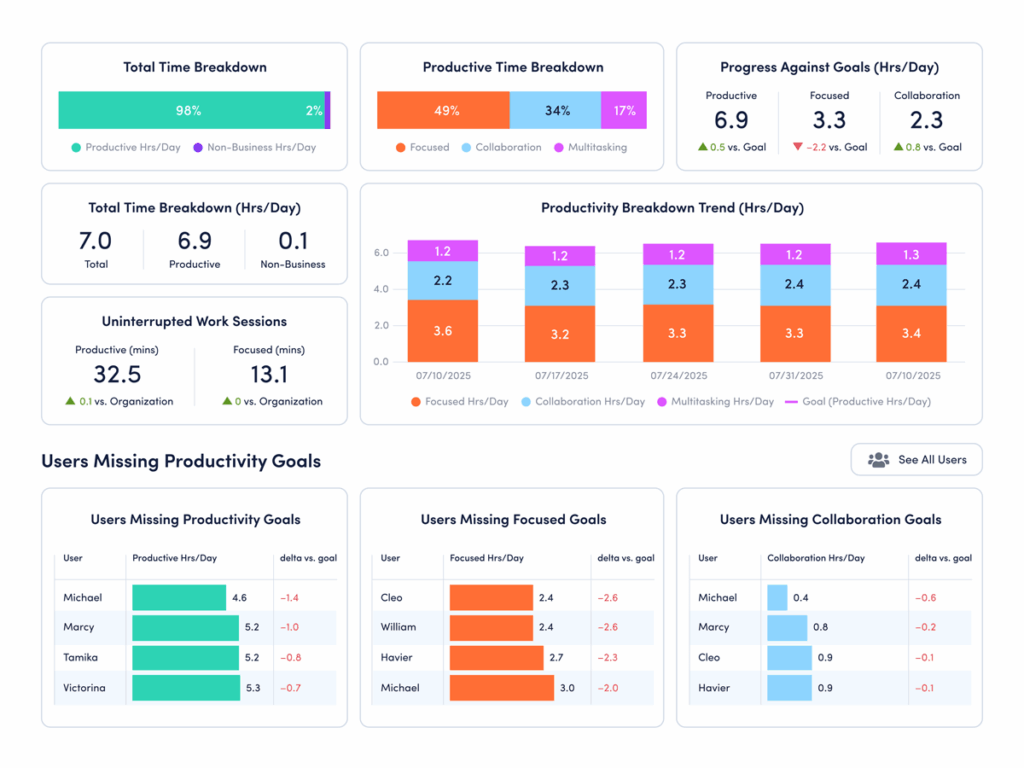
How to compare your data: Use ActivTrak’s Focus & Collaboration dashboard (available on the Professional plan):
- Navigate to Productivity Optimization > Focus & Collaboration.
- Change Activity Date to “Last 90 Days.”
- Under “Productive Time Breakdown,” hover over the bar chart to see the average number of daily hours your employees spend on collaboration.
How to interpret the data:
- If collaboration time is significantly higher than 52 minutes/day: This is above the current benchmark and may support alignment. But are your teams sacrificing needed focus time for meetings and messaging? Look closer at how that time is spent. If collaboration continues to rise alongside multitasking or longer workdays, it may be time to streamline communication and protect focus time.
- If collaboration time is significantly lower than 52 minutes/day: This is below the current benchmark, but lower collaboration time isn’t automatically a problem. It may reflect efficient async workflows or roles that require deep, independent work. Or it might signal gaps in communication. Compare collaboration time with outcomes. If productivity or engagement is lagging, your teams may need more structured touchpoints.
- If collaboration time is in the range of 50-60 minutes/day: You’re operating within the current benchmark range. However, it’s important to remember that the appropriate amount of collaboration time varies by industry, team norms and business goals. Assess the quality of that time to identify which types of collaboration drive results — and which create noise. Then refine your approach to ensure conversations support progress without disrupting it.
2. How much time do your teams spend multitasking?
The finding: Employees are multitasking more than ever.
Multitasking rose 12% to 1 hour 33 minutes per day. In 2025, every quarter recorded higher multitasking than any quarter in 2023 or 2024. This isn’t an isolated spike — it’s a sustained trend. Employees spend more time switching between tasks, tools and conversations, often in quick succession throughout the day.
Why it matters: Too much multitasking reduces focus and slows meaningful progress.
Multitasking may feel productive but often has the opposite effect. Frequent task switching breaks concentration and makes it harder to complete high-value work. Whether it’s messaging during a meeting or chatting while tackling an important task, each context switch creates a reset point that slows momentum. The result is often longer completion times, more errors and a workday that feels fragmented. Employees stay busy but struggle to make consistent, meaningful progress.
How to compare your data: Use ActivTrak’s Focus & Collaboration dashboard (available on the Professional plan):
- Navigate to Productivity Optimization > Focus & Collaboration.
- Change Activity Date to “Last 90 Days.”
- Under “Productive Time Breakdown,” hover over the bar chart to see the average number of daily hours your employees spend multitasking.
How to interpret the data:
- If multitasking is significantly higher than 1.5 hours a day: This is above the current benchmark for interruptions and context switching. This might signal a work environment where frequent messages and shifting priorities make it hard to stay focused. Look for the sources of disruption. Are employees juggling too many tools or conversations at once? Are priorities unclear? It might be time to reduce unnecessary touchpoints and create more space for focused work.
- If multitasking is significantly lower than 1.5 hours a day: Less multitasking may indicate a more focused, structured work environment — especially if your productive hours are high. But it’s worth validating. In some cases, low multitasking may reflect limited collaboration or slow response times. Compare this metric with collaboration and output to ensure teams stay aligned while maintaining focus.
- If multitasking is in the range of 1 hour 20 minutes to 1 hour 40 minutes per day: You’re operating close to the current benchmark. The next step is to look at consistency and impact. Identify which teams manage multitasking well — maintaining productivity without constant disruption — and which struggle with fragmented work. Small reductions in task switching often lead to meaningful performance gains.
Stay tuned for additional guidance on utilization, disengagement risk and more
Collaboration and multitasking are key in how work gets done. But as both continue to rise, they also reshape the workday in ways that aren’t always visible.
When you understand how collaboration and multitasking show up across your teams, it’s easier to identify where workflows break down. Use this information to improve communication, reduce unnecessary interruptions and protect time for focused work.
We’ll continue to explore State of the Workplace findings in the next part of this series, where we look at overutilization and burnout risk.
Did you miss part two? Read it here: Benchmark Your Workforce: Workday Patterns.
Prefer to get updates in your inbox? Sign up to be notified as new companion guides are released.