


Understanding your team’s work habits is key to driving effective coaching conversations and maximizing productivity. ActivTrak provides tons of rich data to help you gain these insights. But as a manager, you don’t have time to review every report on a regular basis. So where should you start?
To help you zero in on the insights that matter most, we’ve outlined 7 key reports for managers, along with a recommended review cadence. Create email subscriptions to have these reports delivered to your inbox daily, weekly or monthly. We also recommend creating subscriptions for your team members to promote transparency and foster collaboration.
The guidance below will help you use ActivTrak data to increase productivity, identify team members at risk of burnout and promote healthy work habits.
Reports to review daily
These reports provide a quick pulse on your team’s activity, making it easier to manage priorities and workload distribution. They’re ideal for maintaining visibility across distributed teams, especially when schedules don’t allow for daily check-ins with each team member.
1. Real-Time Visibility
With Real-Time Visibility, you get a snapshot of productivity across your team. It includes in-the-moment views of each team member’s activity and summary details of their day — productive hours as a percent of total work time, top category and top activity.
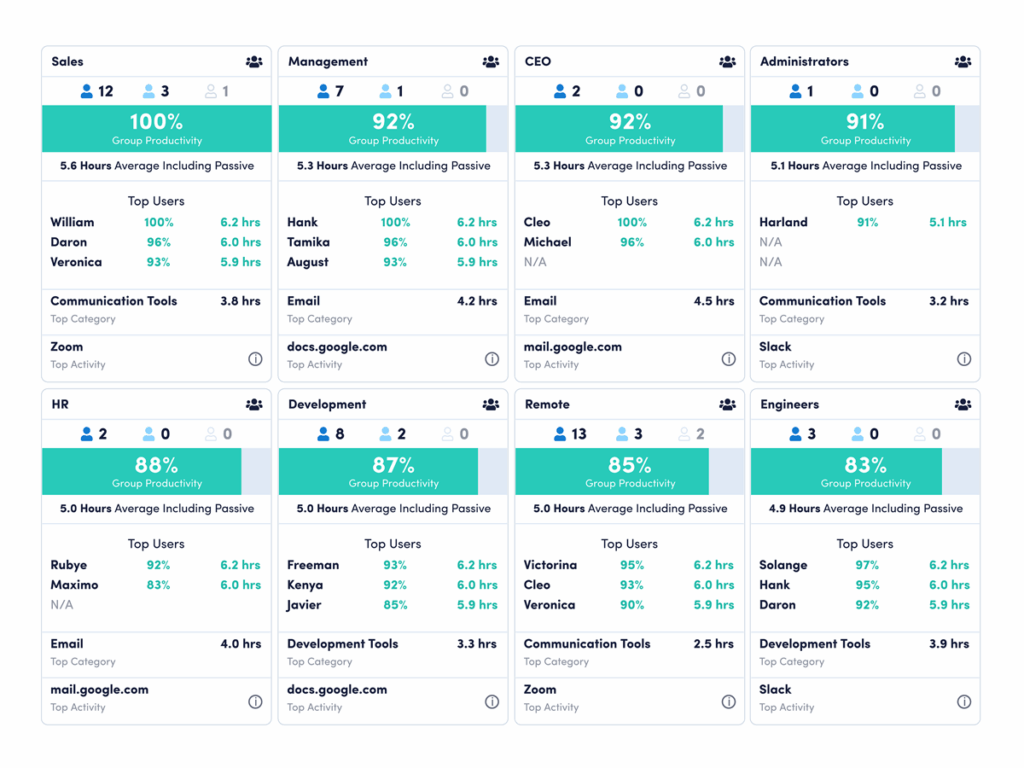
Real-Time Visibility provides a live view of who’s online, plus a summary of activity for the day including how many hours are productive and how much time went to different applications and websites. This dashboard is especially helpful for remote and hybrid team managers — think of it as the digital version of strolling through the office to check on team members.
Ask yourself:
- Do employees’ top categories and activities align with their responsibilities and priorities?
- Do team members spend the majority of their workday on productive activities?
- Do team members consistently work as expected?
View your team’s real-time data. (New to ActivTrak? Sign up for free.)
2. Workload Balance
Workload Balance shows which team members are over- or underutilized, based on their productive hours per day compared to the goals you’ve set.
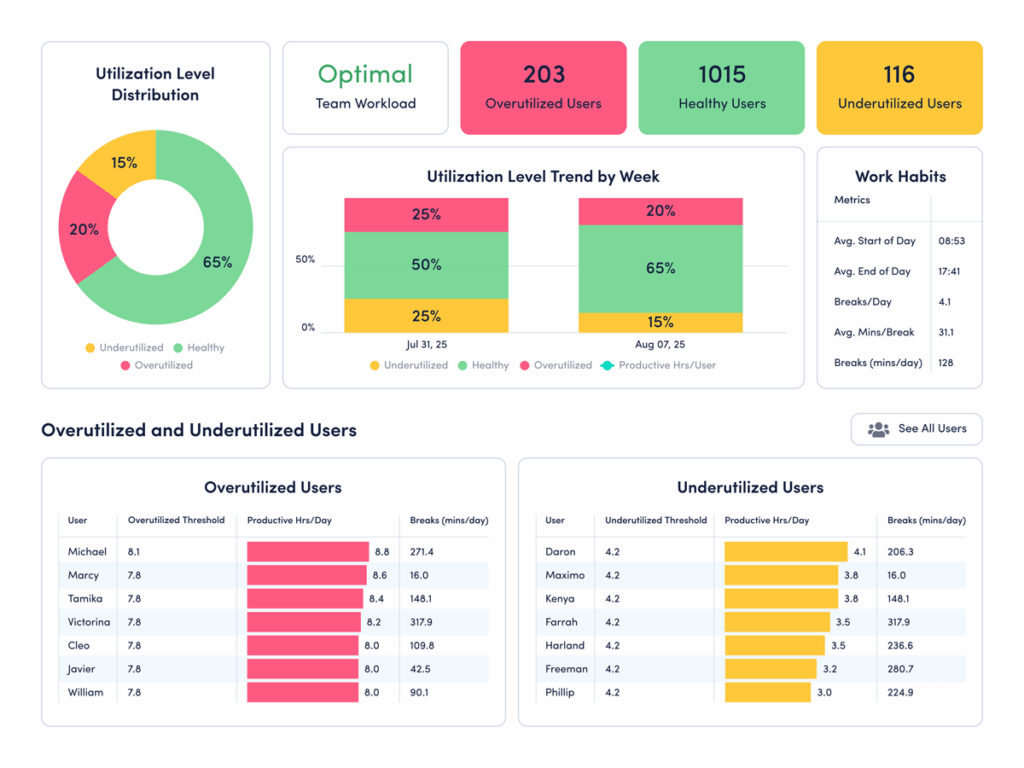
Burnout is tough for managers to prevent, especially because overworked employees often don’t speak up until exhaustion has set in. Monitoring utilization levels helps you spot burnout risk early, empowering you to intervene before it becomes a serious problem.
Ask yourself:
- How many days has a team member been overextended? Is it a trend, or an anomaly due to a major project currently in flight?
- Are underutilized employees completing their projects and meeting deadlines? Or do their low work levels indicate a lack of engagement?
- Is there an opportunity to redistribute work across team members?
View your team’s workload data. (New to ActivTrak? Sign up for free.)
3. Schedule Adherence
With Schedule Adherence, monitor how closely team members follow their assigned work schedules. It automatically tracks late starts, early departures and extended breaks alongside productive time. View location data and attendance patterns to ensure coverage and accountability across distributed teams.
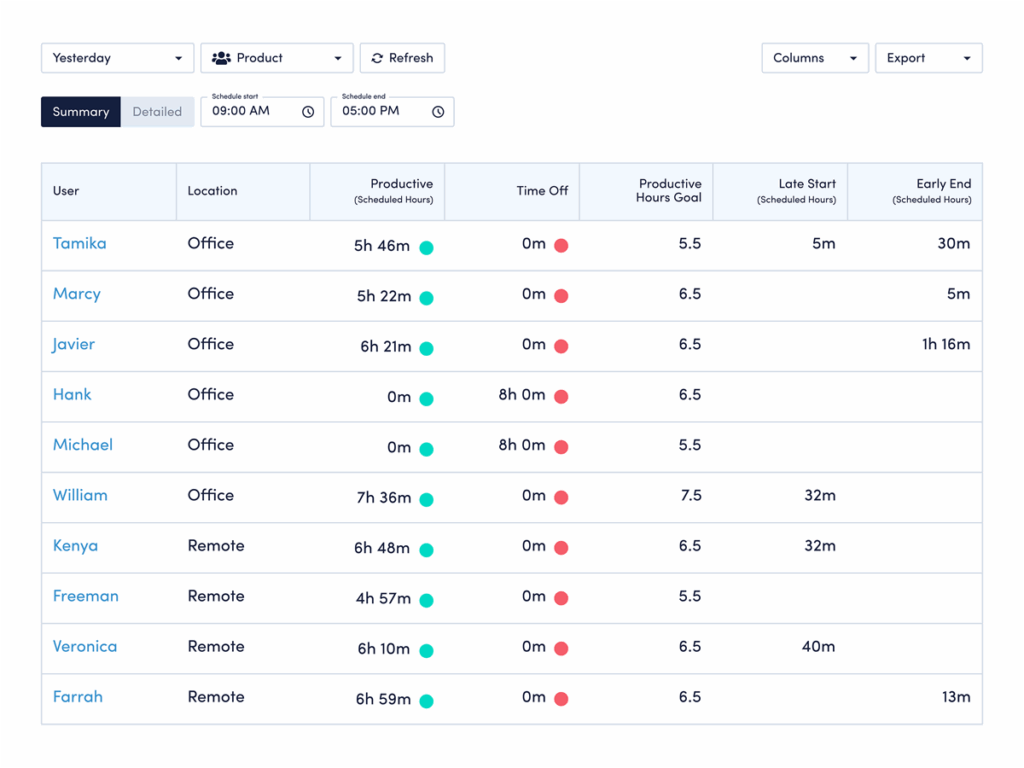
Manually managing schedule compliance is time-consuming and reactive, especially across distributed or shift-based teams. Schedule Adherence provides automated visibility into when and where employees work, helping you immediately address coverage gaps and identify chronic adherence issues — before they impact operations. This is particularly valuable for teams requiring consistent availability during core hours, or for customer-facing roles where schedule deviations create service disruptions.
Ask yourself:
- Do team members consistently start work on time and stay through their scheduled hours?
- Which employees show patterns of late starts or early departures that may require coaching?
- Is productive time concentrated within scheduled hours, or do employees work outside their assigned schedules?
- How can I optimize schedules based on actual work patterns while maintaining necessary coverage during peak demand?
View your team’s schedule adherence data. (New to ActivTrak? Sign up for free.)
Reports to review weekly
Consult these reports weekly to identify patterns in your team’s work habits and assess progress toward goals. Better yet, use the insights to drive conversations around professional development and work-life balance.
4. Benchmarks & Goals
Benchmarks & Goals lets you view trends for productivity and focus across your team’s top quartile, and see daily trends to understand how team productivity and focus have changed over the last 1, 4 or 12 weeks.
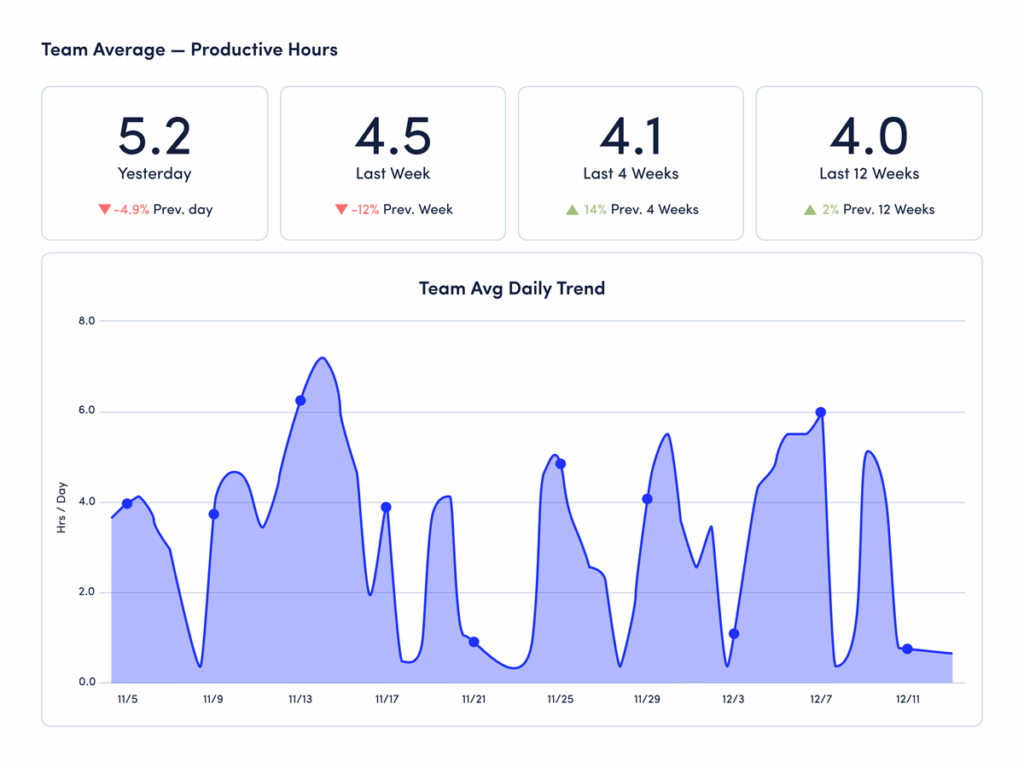
Setting productivity and focus goals at the individual and team level is an effective way to motivate and align team members. Customers often ask us for guidance to determine these goals, but there’s no one set of numbers that makes sense for every individual or team. To set meaningful targets, you must understand the norm — track these metrics over the course of a month to establish benchmarks for improvement.
Ask yourself:
- Are there patterns in the work habits of my team’s top quartile?
- What can other team members learn from them?
- Have individuals made progress against their personal benchmarks, even if they’re below the team average?
View your team’s benchmark and goal data. (New to ActivTrak? Sign up for free.)
5. Focus & Collaboration
Focus & Collaboration shows a breakdown of total work hours into productive time, focused time and collaboration time. Drill into an individual’s name within this report for a detailed analysis of work habits and efficiency in their Personal Insights and Technology Usage stats.
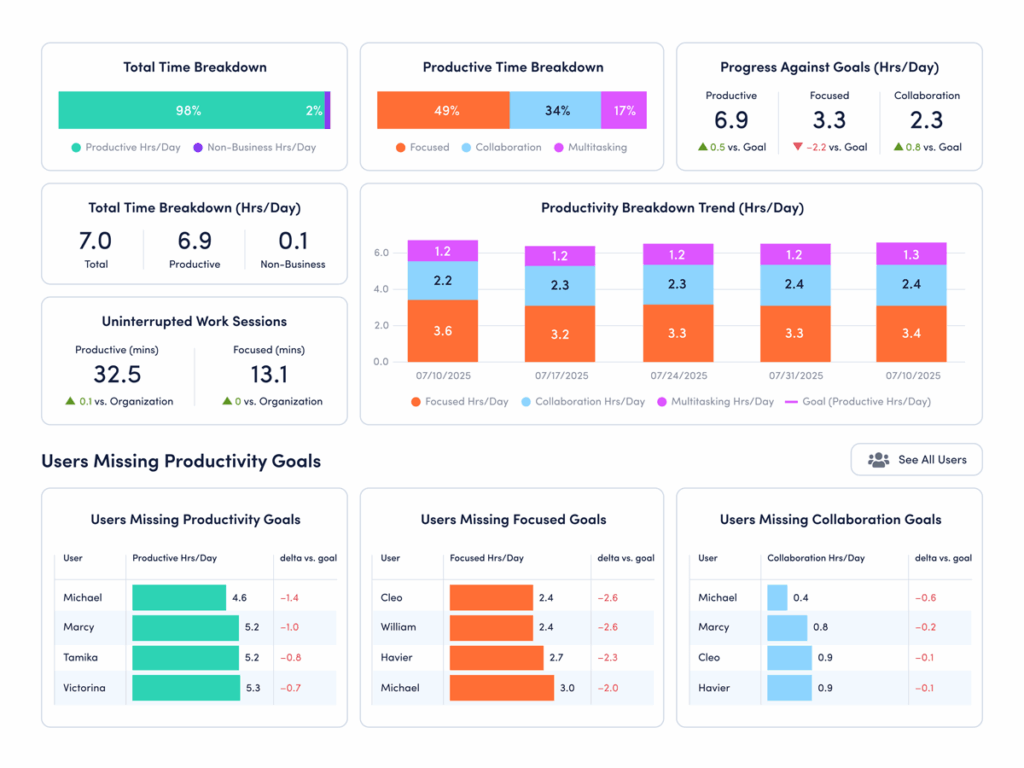
Productive time is useful as a high-level metric — are my employees doing actual work? — but efficiency and focus are more meaningful indicators. They tell you how long it takes team members to complete their work and how much of that time is focused on a particular activity. Carving out time for focus sessions helps people produce better results, faster.
Ask yourself:
- How can employees adjust their work and meeting schedules to take advantage of the days and times when they’re most productive?
- What coaching should I give my team to encourage focused work sessions and remove disruptions?
- How do I leverage these insights to improve collaboration within my team?
View your team’s focus and collaboration data. (New to ActivTrak? Sign up for free.)
Pro Tip: This report is also one you should review monthly. Read on to find out why.
Reports to review monthly
Take time each month to zoom out and assess longer-term trends. Productivity and efficiency fluctuate week-over-week, but consistent patterns emerge when you look at data for 30 days or more.
6. Workforce Utilization
Workforce Utilization quantifies untapped workforce capacity in concrete financial terms, translating underutilization into clear dollar amounts and full-time equivalents (FTEs). View inefficiencies by department, bandwidth and work location. Plus, track trends over time to measure the financial impact of your workforce optimization initiatives.
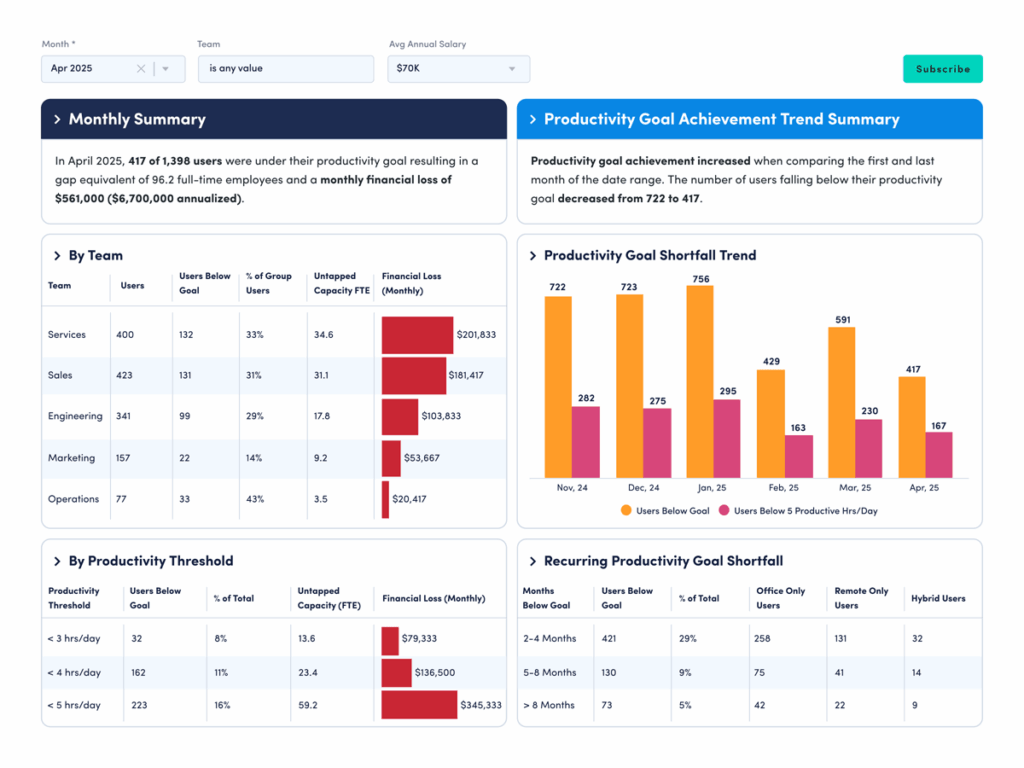
Most organizations lose 20-30% of workforce capacity to hidden inefficiencies, costing millions in unrealized labor ROI each year. As an executive or senior leader, you need to move beyond anecdotal evidence and gut feelings when making resource allocation decisions. Workforce Utilization provides executive-level visibility into exactly how much money your organization loses to underutilized employees. With it, you can identify cost-saving opportunities, avoid unnecessary hires and make data-driven decisions about headcount planning based on actual utilization patterns instead of assumptions.
Ask yourself:
- How much does untapped workforce capacity cost my organization each month in actual dollars?
- Which departments or business units have the most underutilized staff — and how do we reallocate higher-priority initiatives to them?
- Do we request new headcount when existing employees have capacity to take on additional work?
- How do I reward my direct reports for becoming more efficient and improving utilization rates over time?
View your team’s utilization data. (New to ActivTrak? Sign up for free.)
7. Team Comparison
Team Comparison compares productivity, focus, multitasking and collaboration time across teams — and to your organization’s average. Identify correlations between these metrics and each team’s top applications and websites.
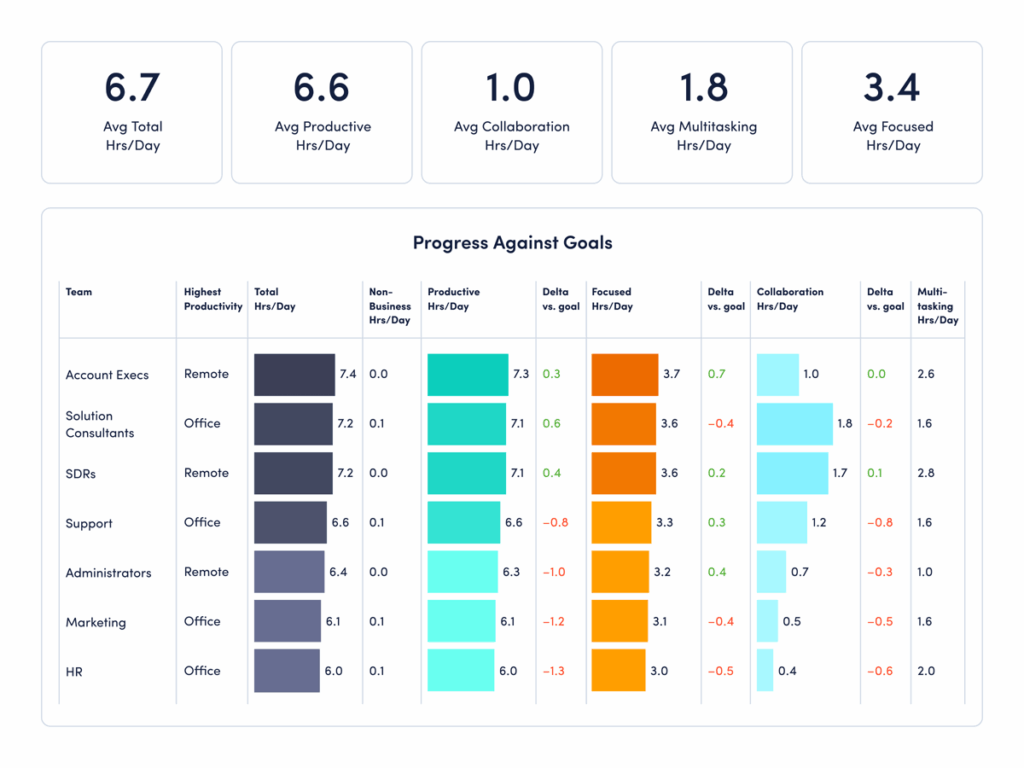
As more organizations embrace hybrid work models, managers face a new set of questions and challenges. Are employees more productive at home or in the office? How does remote work impact employee engagement and work-life balance? This report lets you answer these questions quickly and accurately.
Ask yourself:
- Do remote and in-office teams exhibit distinct patterns when it comes to productivity, focus and efficiency?
- Where does each team spend the majority of its time?
- How do I foster collaboration between in-office and remote workers?
View your team comparison data. (New to ActivTrak? Sign up for free.)
Get started with ActivTrak for free
ActivTrak makes it easy to understand if your team works as productively as possible — and when people need your support to build healthier work habits. Take your management skills to the next level by building these reports into your routine.
Want these ActivTrak reports for your own team? Sign up for a free account today to experience the power of workforce analytics.
This article was originally published on Jun 17, 2021, then updated on Nov 25, 2025