LIVE SESSION

Learn how to answer workforce management questions in seconds — with ActivTrak –  Register now →

Home Solutions ActivTrak for managers

TEAM MANAGERS

Workforce Management Analytics That Deliver Insights for Managers

Get the performance insights you need to build efficient teams; keep employees engaged; and deliver optimal results to the business. Get up and running in minutes.

Picture of ActivTrak

Trusted by 9,500+ global brands and organizations

Make better decisions on how to run your team and optimize performance

Managers are expected to know it all: who does what, how, why and when. On top of that, they’re expected to motivate, engage, improve, coach and deliver – a challenging endeavor without the right analysis of key metrics.

ActivTrak delivers the management analytics you need to:

Get started free
stars
A speech bubble with 3 stars in it, next to the words Gartner Peer Insights.

Better Data, Better Decisions with ActivTrak
“The data and insight provided by the built-in dashboards is everything we wanted and more, and our employees enjoy having access to their data to monitor their own performance and productivity.”
– Director Of Business Development, Services Industry
Read more reviews

TEAM MANAGEMENT

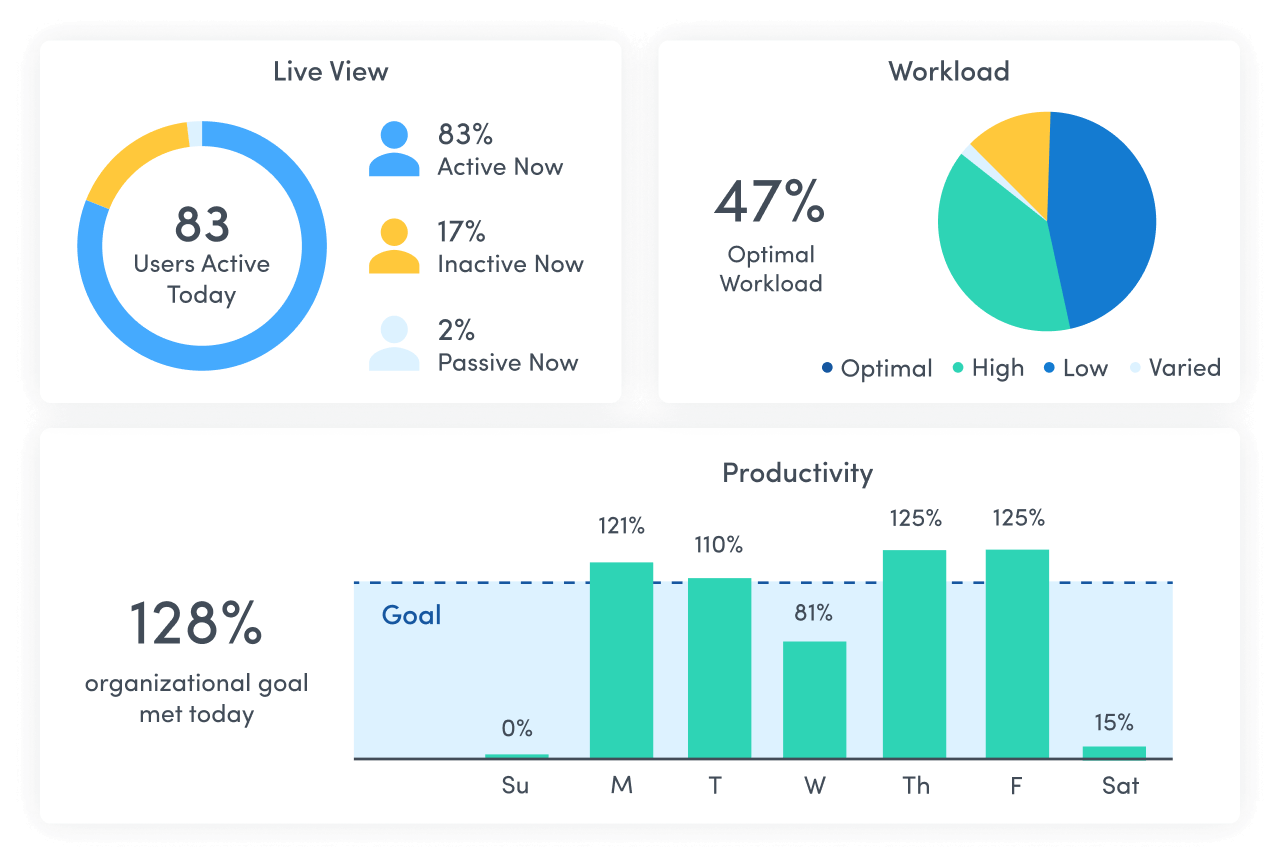
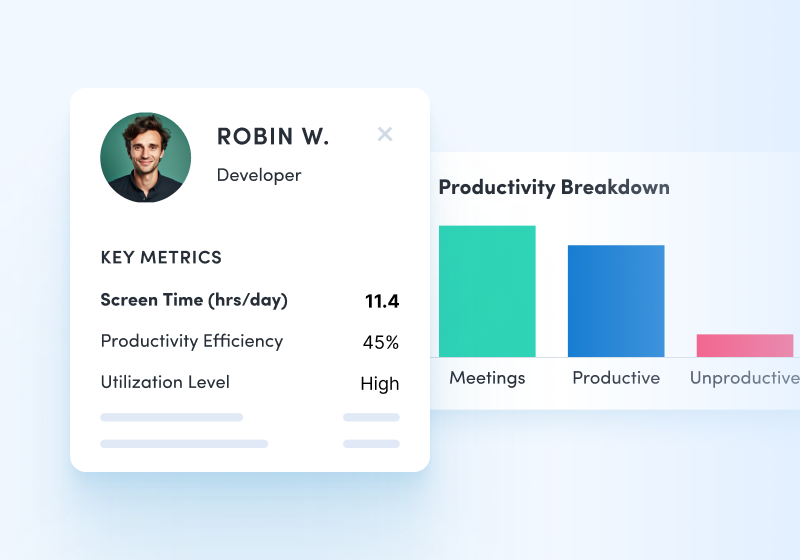
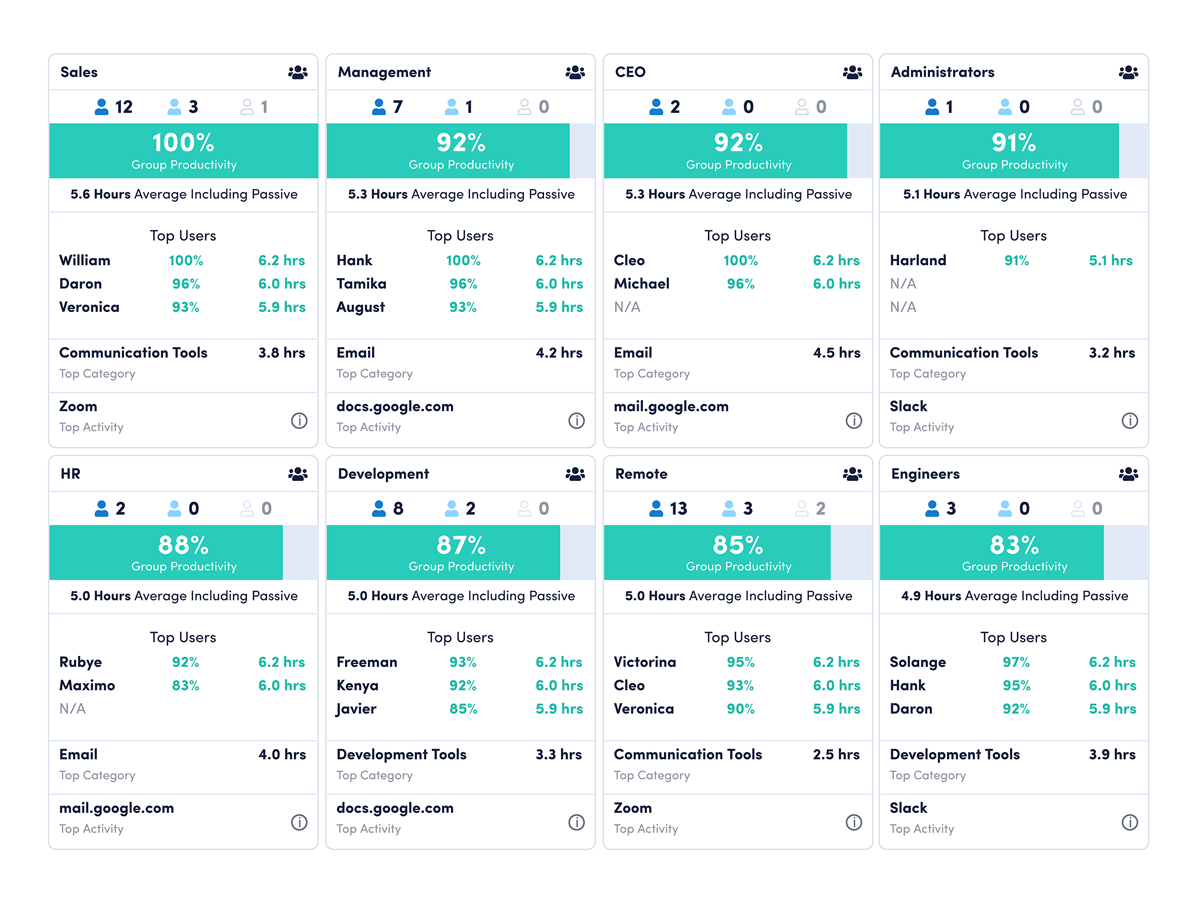
Track team availability and productivity with real-time insights

  • See team members online any time throughout the day.
  • Measure team progress towards daily productivity goals and compare historical goal trends.
  • See team workload and productivity patterns over the past 30 days.
Explore dashboards

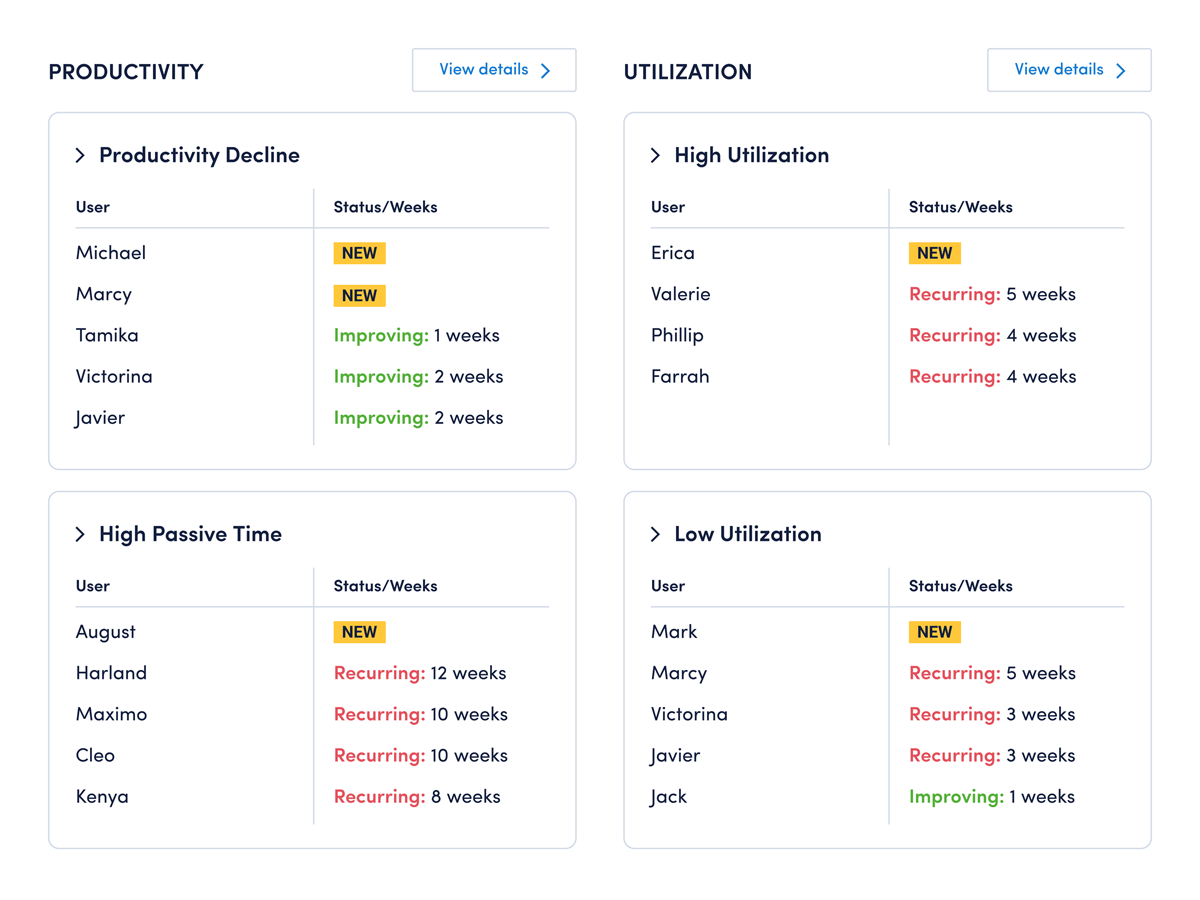
PRODUCTIVITY COACHING

Empower teams to do their best work and achieve big goals

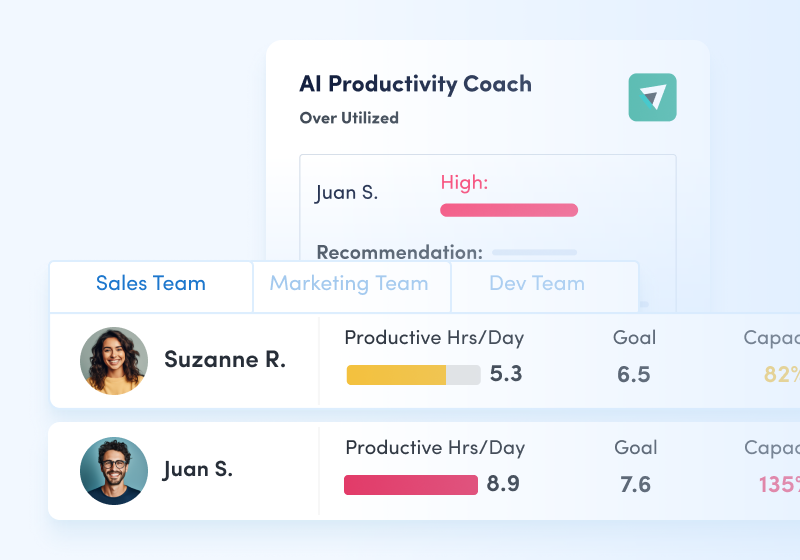
  • Get personalized recommendations from our virtual coach to help fine-tune workload balance, productivity, efficiency, and focus across your team.
  • Review coaching opportunities — updated weekly — to understand where team members can work wiser.
  • Assess the impact of your coaching on team member work habits, with week-over-week trend reports that make it easy to gauge improvement and spot ongoing issues.
  • Empower employees to take charge of their professional development. Personal Insights reports give team members visibility into their work habits and tips for improving productivity and work-life balance.
Explore productivity coaching
A coaching opportunities screenshot that shows a coaching summary.

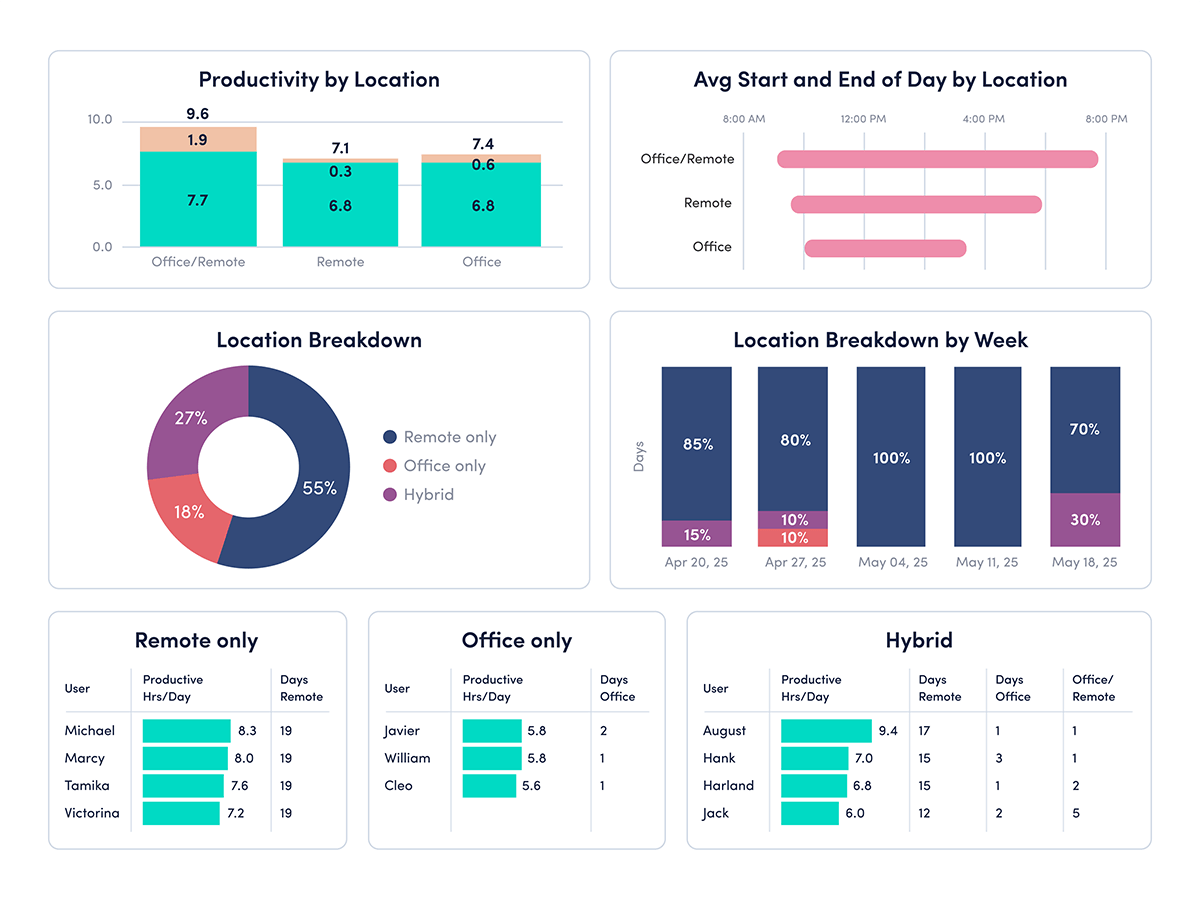
PRODUCTIVITY REPORTS

Understand how & where your teams work

  • See team member productivity by location — office, remote and hybrid
  • Understand how employee time is divided between focused work, collaboration and multitasking
  • View team trends to assess how productivity and focus change over time
Explore productivity reports

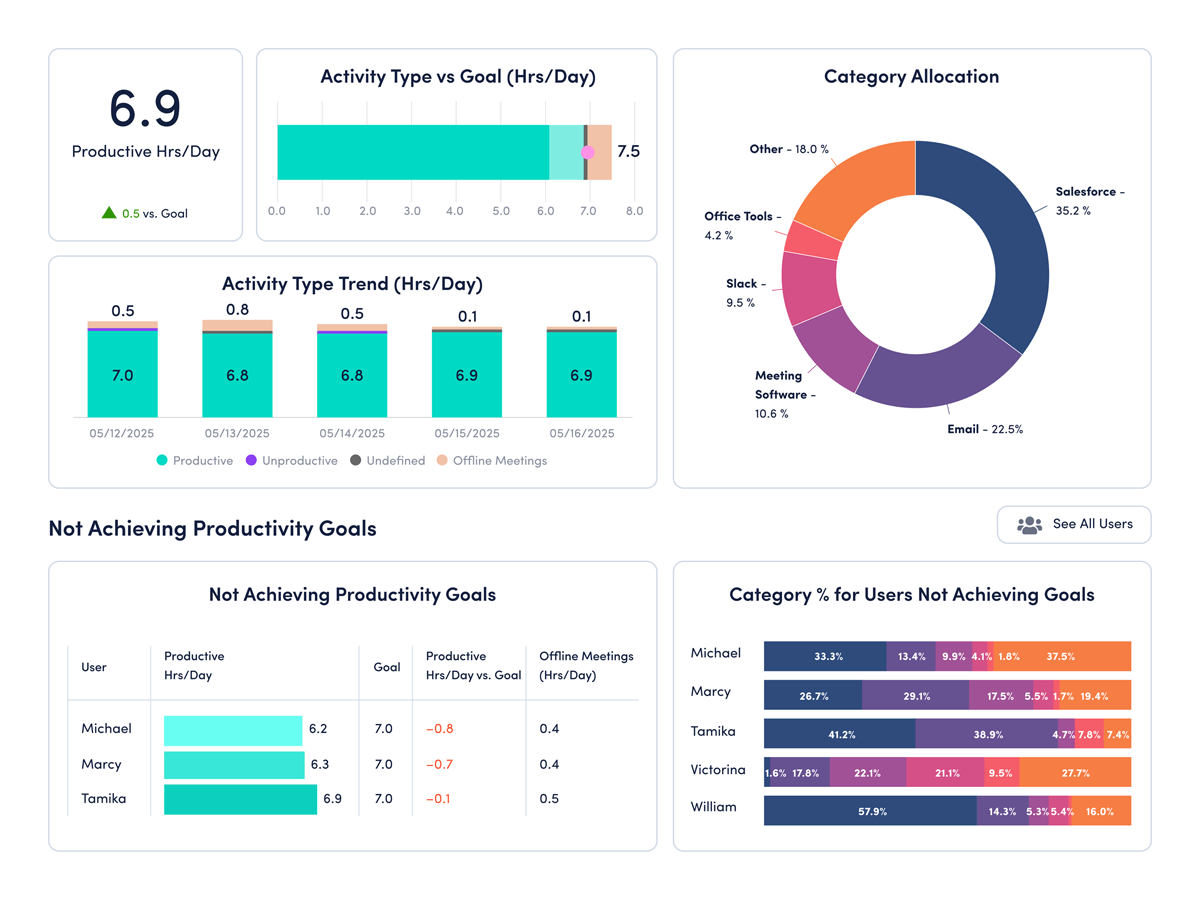
PRODUCTIVITY MONITORING & MANAGEMENT

Unlock your team’s potential and drive performance

  • Uncover where roadblocks get in the way of work and remove them 
  • Identify workload imbalances and cross-functional collaboration issues
  • Understand if your team’s behaviors are meeting and exceeding goals
Explore productivity management
Productivity dashboard detailed view

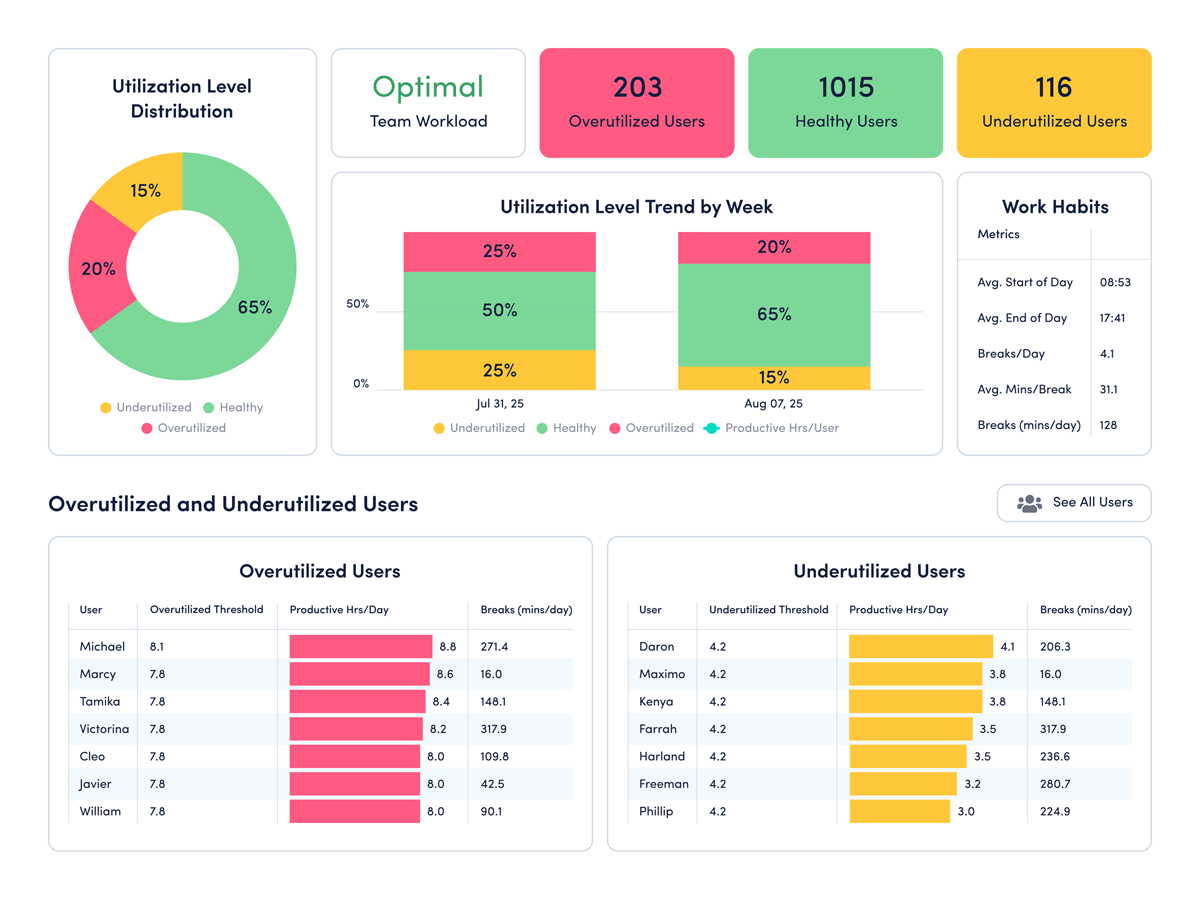
ENGAGEMENT & BURNOUT

Engage everyone, everywhere

  • Identify employees who are exhibiting high burnout risk so you can intervene proactively no matter where they work
  • Gain insights to proactively deliver support in advance of performance challenges 
  • Share productivity results with individuals for collaboration and coaching opportunities
Explore managing employee engagement
ActivTrak's workload balance report showing workforce analytics trends for a team.

Explore our powerful features

ActivTrak is the most comprehensive workforce analytics solution, with robust features to address your employee monitoring, productivity management and workforce planning needs. Make data-driven decisions to quickly optimize performance and boost productivity.

Workforce Management

Remote Workforce Management

Remote Workforce Management

Track employee productivity by work location to guide workplace policy decisions.

Location insights graph showing Productivity by Location with bars for Hybrid, Remote, Office. Below, a section for User with a photo and a table displaying productive hours: Paul 34 total, 10 hybrid, 6 remote, 18 in office. Entries for Jack and Linda are grayed out.
Explore workforce management

Employee Monitoring

Employee Monitoring

Get real-time visibility into team activity and productivity levels.

Team pulse dashboard showing three productivity statuses: Out of Office (0%), Late to Work (73%), and High Productivity (92%). Timeline below highlights different productivity levels throughout the day.
Explore employee monitoring

Time Tracking & Auditing

Time Tracking & Auditing

Get detailed insight into employee work hours and locations, with time categorized as productive, unproductive or undefined.

Time tracking and auditing table showing user activity with a focus on Darius G., who is remote with only 6 minutes active time, flagged as an issue due to expected hours being 8.
Explore time tracking & auditing

Schedule & Policy Adherence

Schedule & Policy Adherence

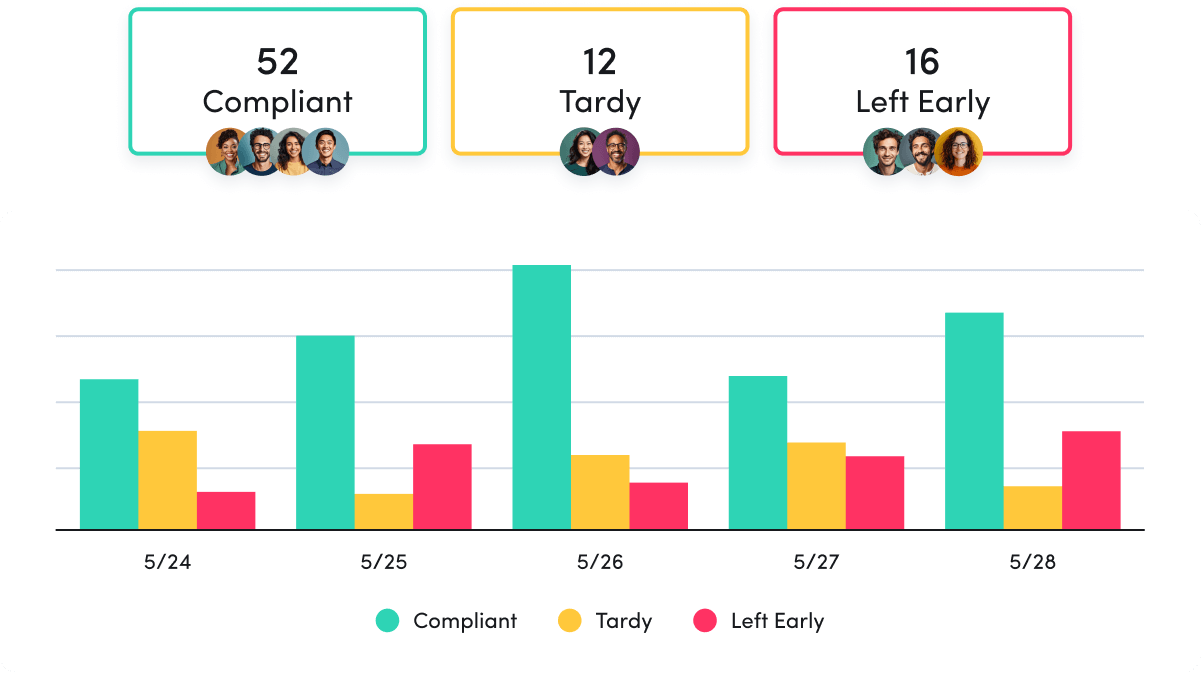
Monitor late starts, early departures and extended breaks in real time.

Schedule policy adherence bar chart showing attendance from 5/24 to 5/28. The categories are Compliant, Tardy, and Left Early. Compliant has the highest numbers, followed by Tardy and Left Early. Summary boxes above show totals: 52 Compliant, 12 Tardy, 16 Left Early.
Explore schedule & policy adherence

Contractor Billing Reconciliation

Contractor Billing Reconciliation

Confirm contractor hours billed match hours worked.

Explore billing reconciliation

Productivity Optimization

Productivity Management

Productivity Management

Make data-driven decisions to fuel productivity across teams and individuals.

A team productivity chart for three people: Suzanne R. (73% productive), Juan S. (65% productive), and Velma D. (84% productive). Time slots from 9 AM to 5 PM indicate levels of inactivity, productivity, and un-productivity
Explore productivity management

Performance Optimization & Coaching

Performance Optimization & Coaching

Leverage AI-powered insights to understand and optimize team performance.

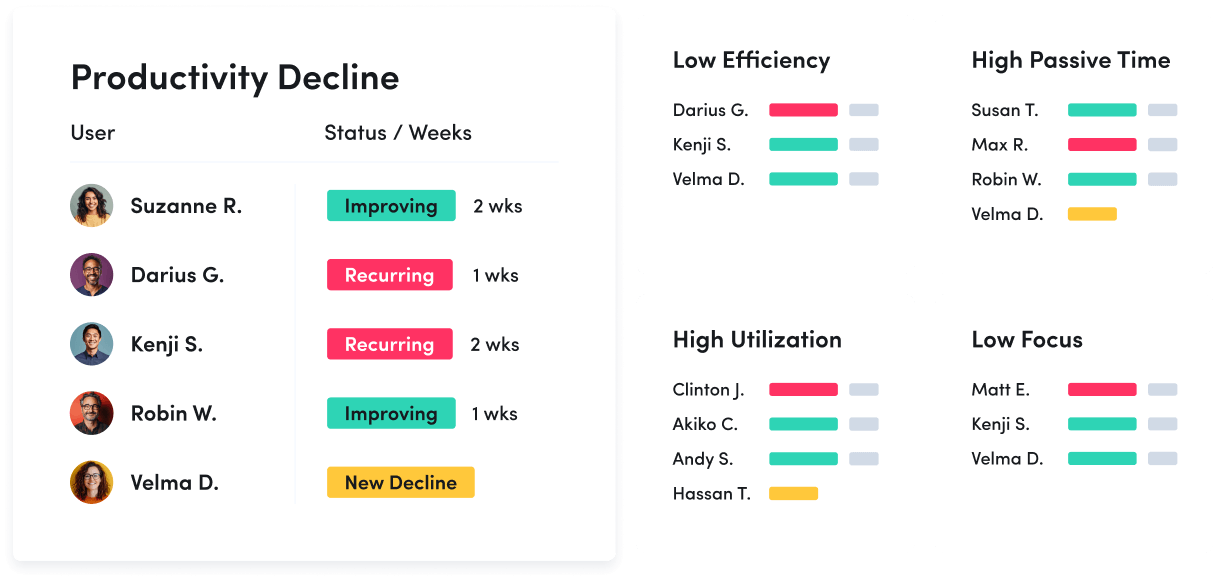
A productivity coaching dashboard showing user statuses: improving, recurring decline, and new decline. Four categories track low efficiency, high passive time, high utilization, and low focus, listing names with colored progress bars.
Explore performance optimization & coaching

Employee Engagement & Burnout

Employee Engagement & Burnout

Assess employee utilization to detect burnout and balance workloads.

A workload balance chart shows the status of 43 employees: 34 healthy, 7 underutilized, 2 over-utilized. Next to it, a profile for Suzzane R., Manager, shows expected hours as 7, actual hours as 5.1, and utilization at 73%.
Explore employee engagement & burnout

Workforce Planning

Workforce Optimization & Cost Savings

Workforce Optimization & Cost Savings

Uncover hidden inefficiences to cut costs and boost profitability.

Explore workforce optimization

Capacity & Headcount Planning

Capacity & Headcount Planning

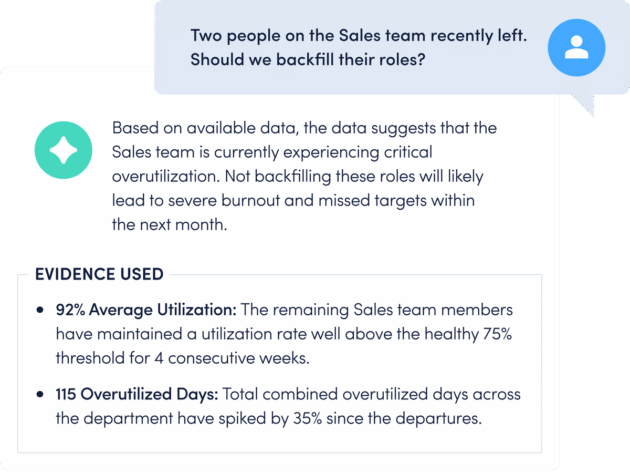
Analyze workload capacity to allocate resources and identify staffing needs.

A workload balance comparison chart of four people with their productive hours per day, goals, capacity, and workload. Suzanne R. is under capacity, Juan S. is over capacity, and Darius G. and Akiko C. have data without capacity details.
Explore capacity & headcount planning

Technology Optimization

Technology Optimization

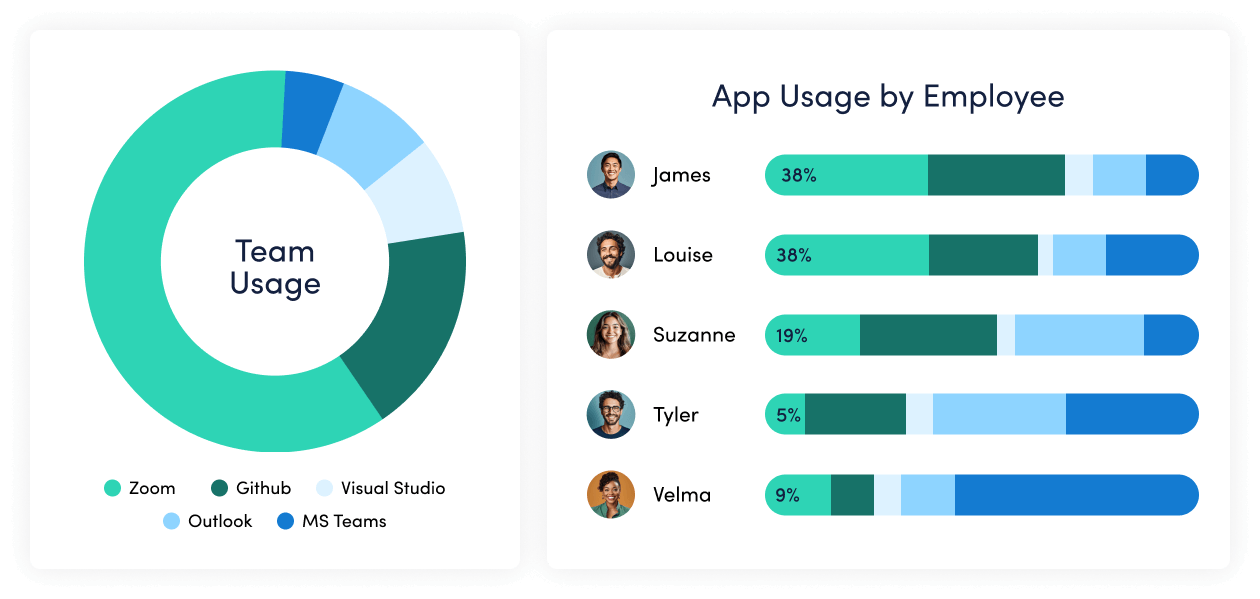
Track technology usage to identify unused licenses and cut unnecessary costs.

A chart shows tech application license data. Microsoft Teams: 38 active, 500 total, 7.6% usage, $83,160 savings; Salesforce: 96 active, 300 total, 32% usage, $146,860 savings; Zendesk: 71 active, 150 total, 47% usage, $61,620 savings. Microsoft Teams unused: 462.
Explore technology optimization

Office Space Planning

Office Space Planning

Right-size real estate investments with insight into office space utilization.

An office space planning view that shows office space usage. Austin office: 28% occupied, 415 desks unused, 120 occupied. Comparisons: San Francisco office uses 42%, New York 70%. Potential savings: Austin $74,340; San Francisco $135,780; New York $72,000.
Explore office space planning

Remote Workforce Management

Track employee productivity by work location to guide workplace policy decisions.

Location insights graph showing Productivity by Location with bars for Hybrid, Remote, Office. Below, a section for User with a photo and a table displaying productive hours: Paul 34 total, 10 hybrid, 6 remote, 18 in office. Entries for Jack and Linda are grayed out.
Explore workforce management

Employee Monitoring

Get real-time visibility into team activity and productivity levels.

Team pulse dashboard showing three productivity statuses: Out of Office (0%), Late to Work (73%), and High Productivity (92%). Timeline below highlights different productivity levels throughout the day.
Explore employee monitoring

Time Tracking & Auditing

Get detailed insight into employee work hours and locations, with time categorized as productive, unproductive or undefined.

Time tracking and auditing table showing user activity with a focus on Darius G., who is remote with only 6 minutes active time, flagged as an issue due to expected hours being 8.
Explore time tracking & auditing

Schedule & Policy Adherence

Monitor late starts, early departures and extended breaks in real time.

Schedule policy adherence bar chart showing attendance from 5/24 to 5/28. The categories are Compliant, Tardy, and Left Early. Compliant has the highest numbers, followed by Tardy and Left Early. Summary boxes above show totals: 52 Compliant, 12 Tardy, 16 Left Early.
Explore schedule & policy adherence

Contractor Billing Reconciliation

Confirm contractor hours billed match hours worked.

Explore billing reconciliation

Productivity Management

Make data-driven decisions to fuel productivity across teams and individuals.

A team productivity chart for three people: Suzanne R. (73% productive), Juan S. (65% productive), and Velma D. (84% productive). Time slots from 9 AM to 5 PM indicate levels of inactivity, productivity, and un-productivity
Explore productivity management

Performance Optimization & Coaching

Leverage AI-powered insights to understand and optimize team performance.

A productivity coaching dashboard showing user statuses: improving, recurring decline, and new decline. Four categories track low efficiency, high passive time, high utilization, and low focus, listing names with colored progress bars.
Explore performance optimization & coaching

Employee Engagement & Burnout

Assess employee utilization to detect burnout and balance workloads.

A workload balance chart shows the status of 43 employees: 34 healthy, 7 underutilized, 2 over-utilized. Next to it, a profile for Suzzane R., Manager, shows expected hours as 7, actual hours as 5.1, and utilization at 73%.
Explore employee engagement & burnout

Workforce Optimization & Cost Savings

Uncover hidden inefficiences to cut costs and boost profitability.

Explore workforce optimization

Capacity & Headcount Planning

Analyze workload capacity to allocate resources and identify staffing needs.

A workload balance comparison chart of four people with their productive hours per day, goals, capacity, and workload. Suzanne R. is under capacity, Juan S. is over capacity, and Darius G. and Akiko C. have data without capacity details.
Explore capacity & headcount planning

Technology Optimization

Track technology usage to identify unused licenses and cut unnecessary costs.

A chart shows tech application license data. Microsoft Teams: 38 active, 500 total, 7.6% usage, $83,160 savings; Salesforce: 96 active, 300 total, 32% usage, $146,860 savings; Zendesk: 71 active, 150 total, 47% usage, $61,620 savings. Microsoft Teams unused: 462.
Explore technology optimization

Office Space Planning

Right-size real estate investments with insight into office space utilization.

An office space planning view that shows office space usage. Austin office: 28% occupied, 415 desks unused, 120 occupied. Comparisons: San Francisco office uses 42%, New York 70%. Potential savings: Austin $74,340; San Francisco $135,780; New York $72,000.
Explore office space planning

ActivTrak fits your stack

Get deeper insights, integrate with any app.

Saleforce

Microsoft Teams logo.

Microsoft Teams

Slack

Slack

ServiceNow

Zendesk

Zoom

Microsoft Viva

lattice logo

Lattice

qualtrics logo

Qualtrics XM

jira logo

Jira Software

Workday

ADP

culture amp logo

Culture Amp

asana logo

Asana

How it works

Collect

Use the ActivTrak Agent to gather digital activity data about how employees work while safeguarding employee privacy.

Analyze

Assess productivity drivers, engagement levels and work habits through intuitive dashboards and AI-powered reports.

Optimize

Use ActivTrak Coach to improve productivity, performance and resource utilization for organizational health and well-being.

See what customers say about ActivTrak

Powered byThe words Trust Radius in blue text.

Getting started is easy. Be up and running in minutes.

Get started free Get started
Watch demo Watch demo