REPORT

Missed goals cost more than you think. See how much with our Utilization Benchmarks Report –  Read now →

Home Solutions SaaS management

Solution

SaaS Management Software

Get the visibility you need to identify which applications are being used by employees, how often, and how they impact productivity. Begin tracking software usage in just minutes.

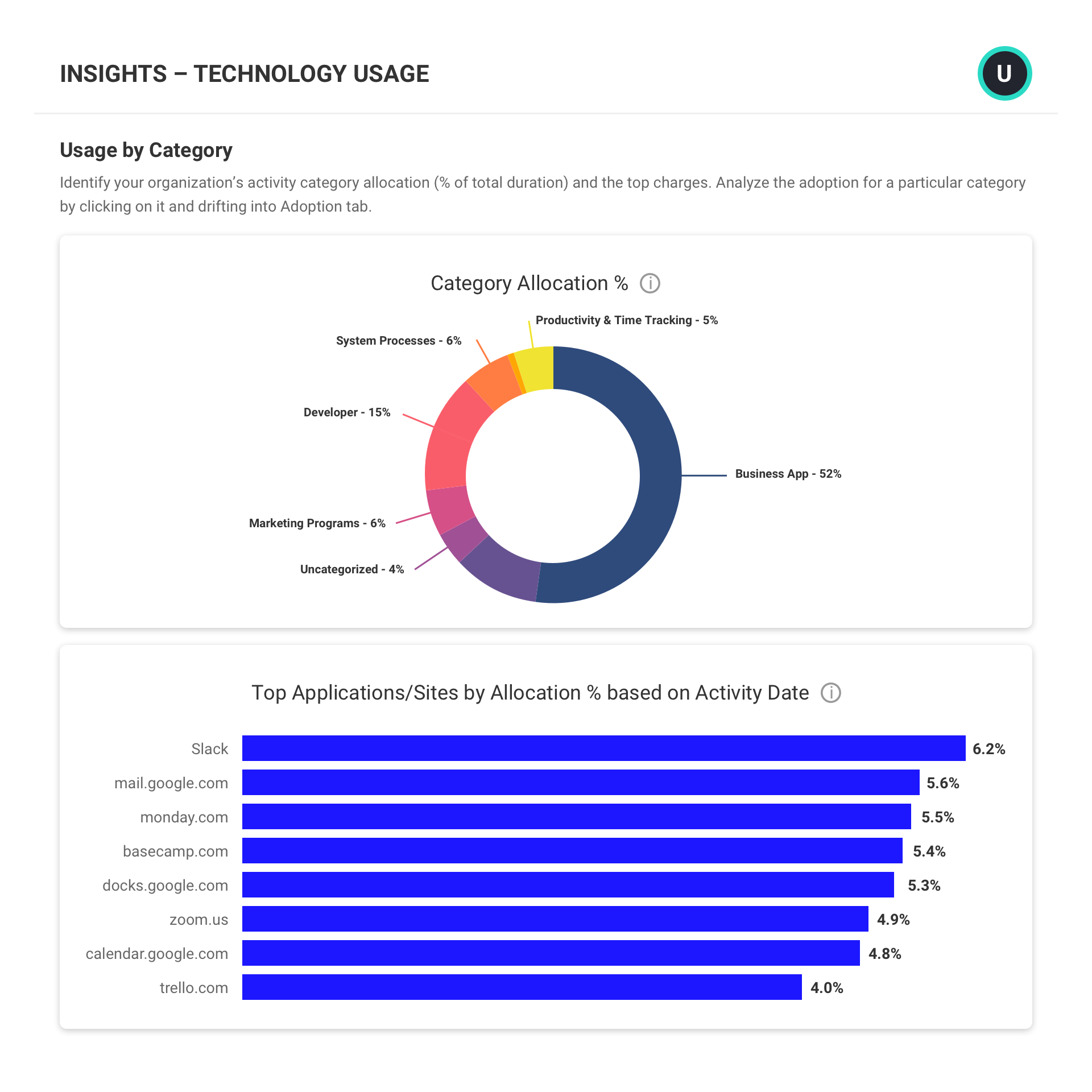
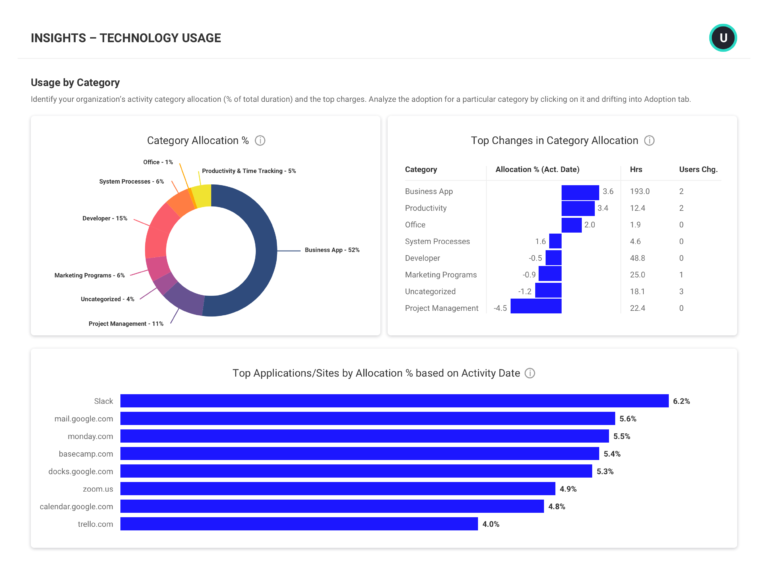
An Insights report showing technology usage report consisting of a Usage by Category doughnut chart and a bar chart.

Trusted by 9,500+ global brands and organizations

SaaS management

Streamline your SaaS investments

Seeing application adoption, proliferation, and misalignment across an organization can be done many ways through tracking software usage. But understanding how those conditions affect productivity is a greater challenge. ActivTrak takes application usage tracking a step further to deliver insights into how applications hinder or serve productivity, to help you uncover ways to streamline and save across your application stack. 

Learn how ActivTrak can help you:

Get started free
stars

“It allows us to track software and asset utilization. This will allow us to better manage our people and our money spent on useless equipment and software. It also allows us to tailor our training program to best suit the employees.”

– Bill Nash, Operations Support Manager Nason, Yeager, Gerson, White & Lioce P.A

December 12, 2020
Read more reviews

SOFTWARE USAGE TRACKING

Get control of SaaS application sprawl

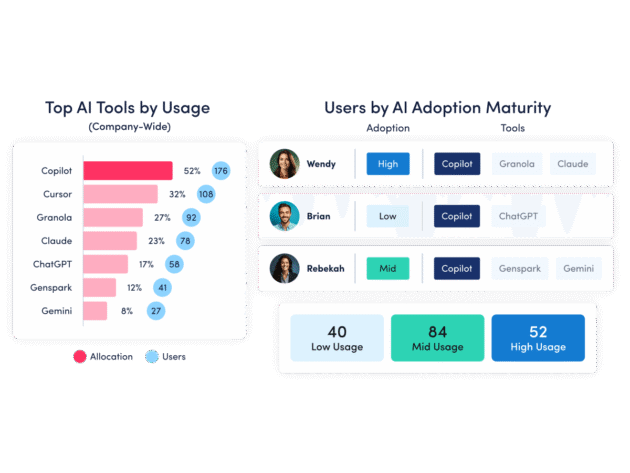
  • Uncover which applications and tools are widely adopted and productive.
  • View usage insights to drive decisions around subscription renewals and license purchases.
  • Identify inactive accounts, unallocated or unused licenses, and apps with overlapping functionality.

SaaS management can go beyond just seeing what is where. With ActivTrak, you can view how application usage relates to productivity and make choices that serve productivity goals.

Explore tracking software usage
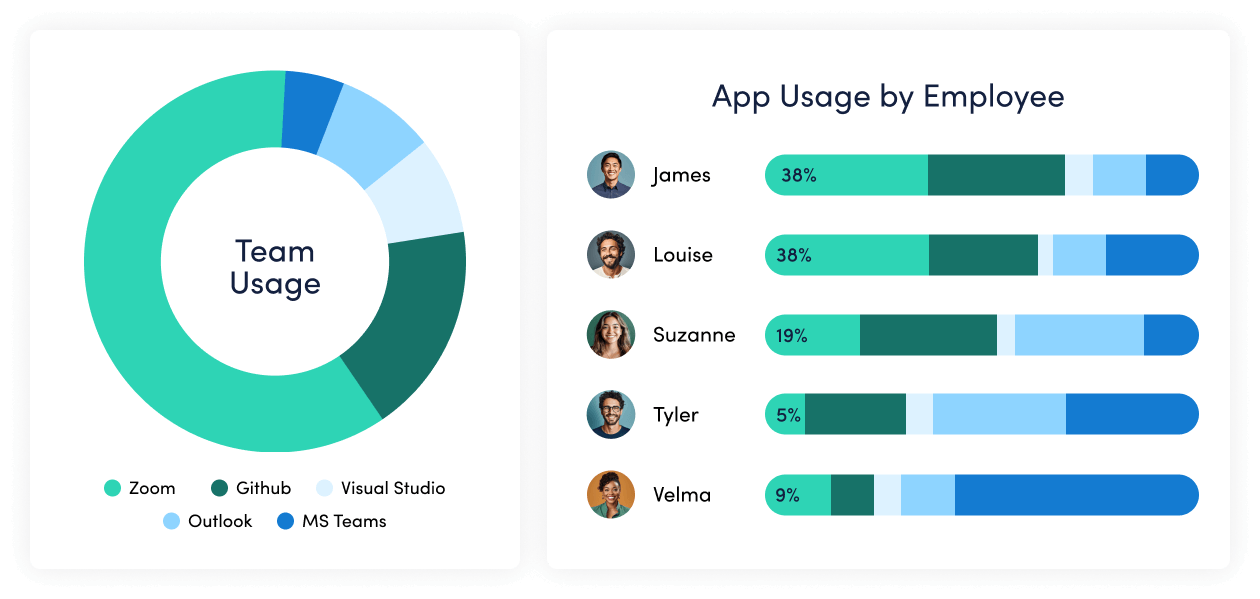
An Insights Technology Usage report showing category allocation in a doughnut chart and a bar chart of top applications.

PRIVACY & SECURITY

Shore up security gaps

  • Uncover applications that fail to meet privacy and security requirements
  • Automatically block or terminate applications that pose a malware risk
  • Identify applications with overlapping functionality to identify cost saving opportunities.
  • See if and when new applications are introduced into your environment and set custom limits.

It’s important to understand which applications fail to meet privacy and security standards needed by your business. But also understanding how applications that meet those requirements are being used, by whom, and from where is also critical to ensure data is safe and secure.

Explore privacy & security
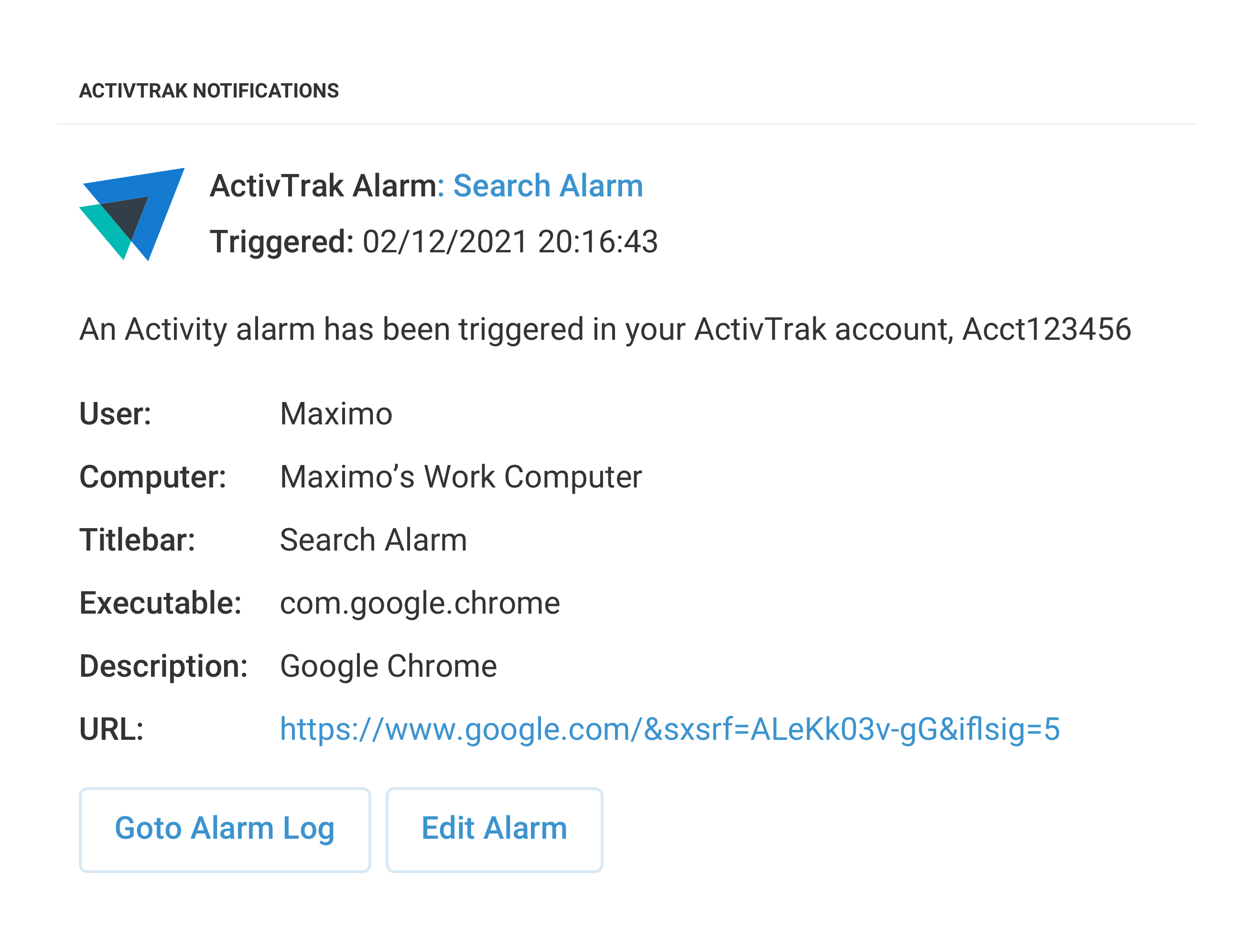
An ActivTrak alarm notification titled Search Alarm, showing a triggered activity alarm.

ALARMS

Reduce application management overhead

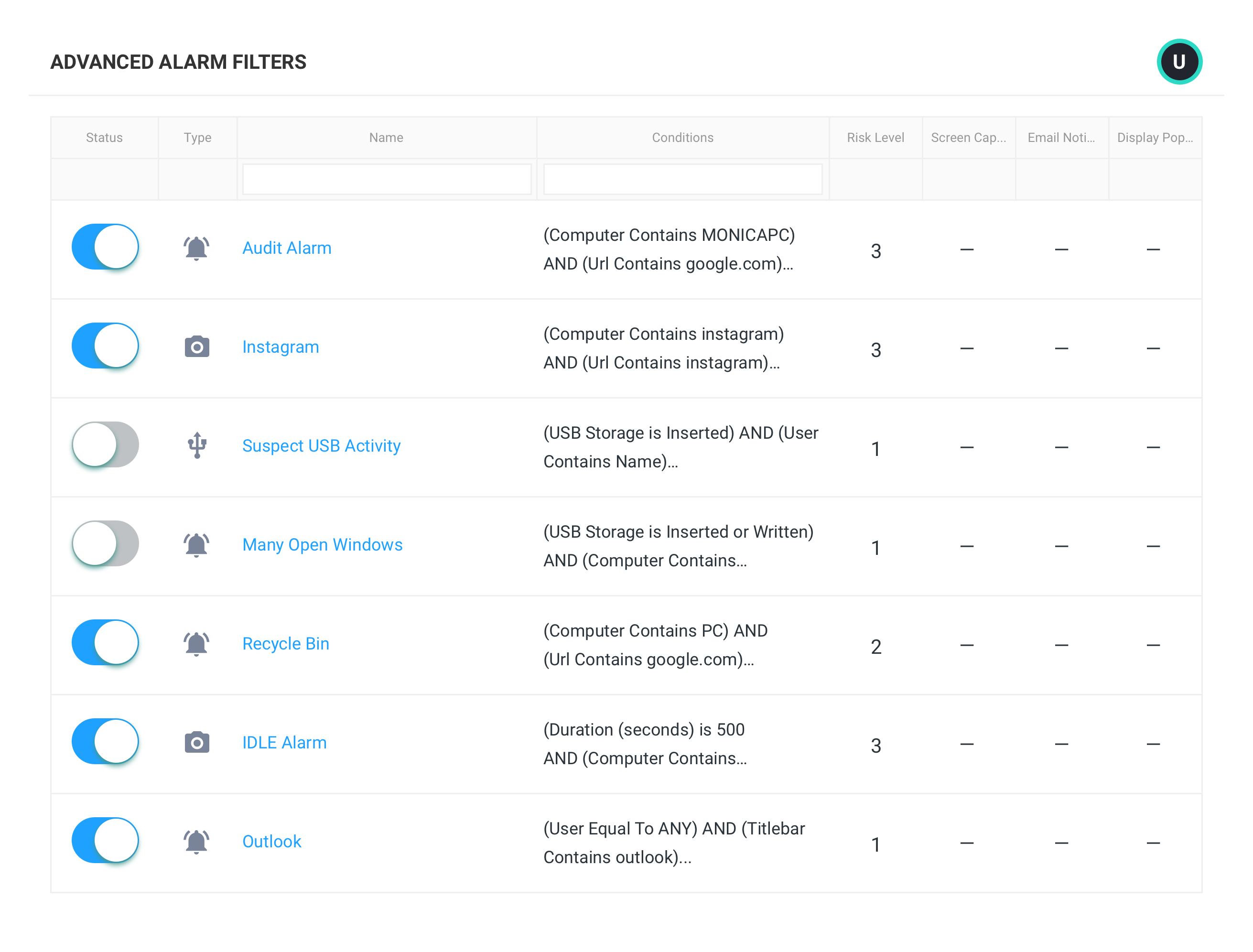
  • Use pre-built alarms for common activities such as USB device use, unauthorized file sharing, access of blocked domains, and user deletion from computers.
  • View user activities and configure automated actions based on user risk scores, risky activities, or actions of interest. 
  • Trigger real-time alarm notifications in Slack, MS Teams, or a custom webhook URL.

ActivTrak’s customizable alarms monitor user activity and trigger notifications when specific behavior occurs, reducing the need for constant and active application management.  ActivTrak’s ability to modify alarms at the department, team, individual, or company-wide levels prevents painting with a broad brush and safeguards against heavy oversights.

Explore alarms
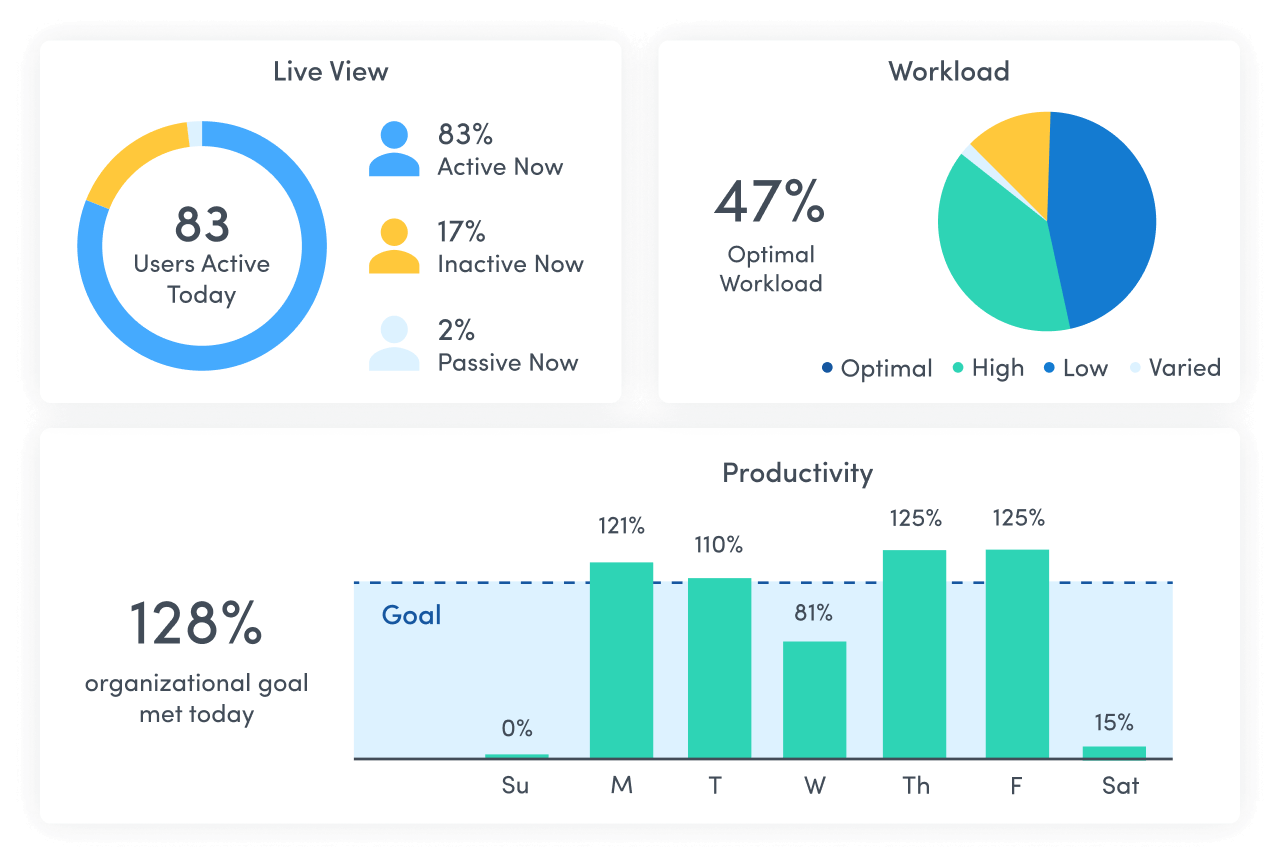
ActivTrak dashboard showing the Alarm Log for employee productivity monitoring.

Explore our powerful features

ActivTrak is the most comprehensive workforce analytics solution, with robust features to address your employee monitoring, productivity management and workforce planning needs. Make data-driven decisions to quickly optimize performance and boost productivity.

Workforce Management

Remote Workforce Management

Remote Workforce Management

Track employee productivity by work location to guide workplace policy decisions.

Location insights graph showing Productivity by Location with bars for Hybrid, Remote, Office. Below, a section for User with a photo and a table displaying productive hours: Paul 34 total, 10 hybrid, 6 remote, 18 in office. Entries for Jack and Linda are grayed out.
Explore workforce management

Employee Monitoring

Employee Monitoring

Get real-time visibility into team activity and productivity levels.

Team pulse dashboard showing three productivity statuses: Out of Office (0%), Late to Work (73%), and High Productivity (92%). Timeline below highlights different productivity levels throughout the day.
Explore employee monitoring

Time Tracking & Auditing

Time Tracking & Auditing

Get detailed insight into employee work hours and locations, with time categorized as productive, unproductive or undefined.

Time tracking and auditing table showing user activity with a focus on Darius G., who is remote with only 6 minutes active time, flagged as an issue due to expected hours being 8.
Explore time tracking & auditing

Schedule & Policy Adherence

Schedule & Policy Adherence

Monitor late starts, early departures and extended breaks in real time.

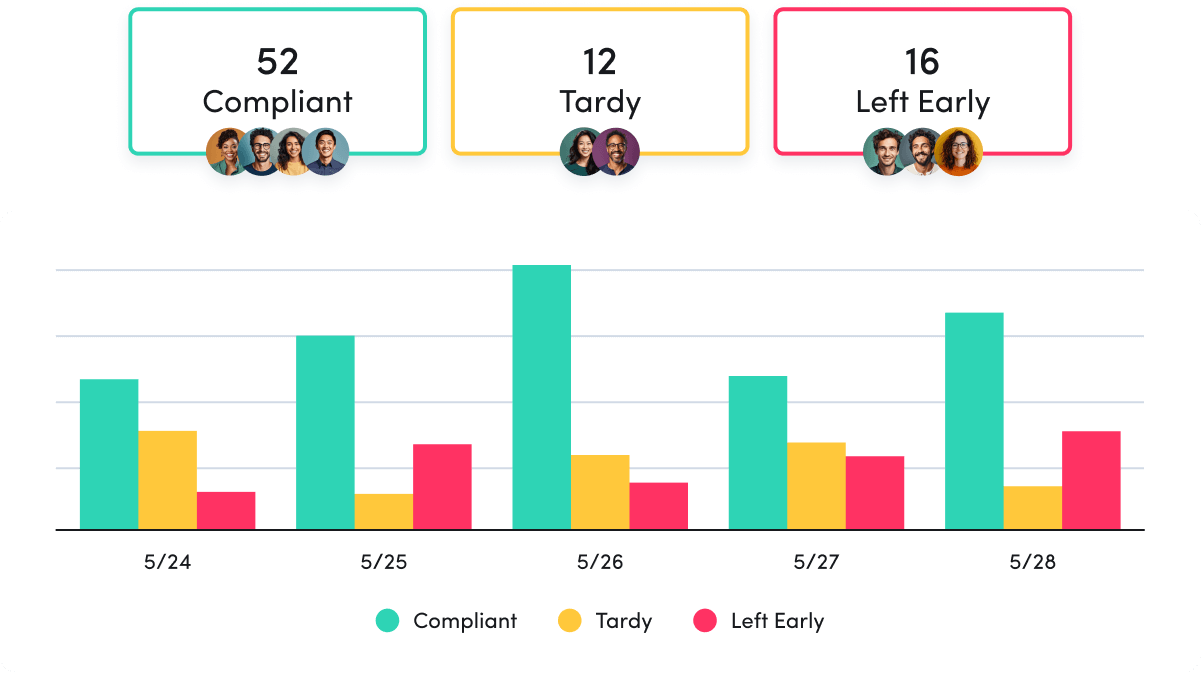
Schedule policy adherence bar chart showing attendance from 5/24 to 5/28. The categories are Compliant, Tardy, and Left Early. Compliant has the highest numbers, followed by Tardy and Left Early. Summary boxes above show totals: 52 Compliant, 12 Tardy, 16 Left Early.
Explore schedule & policy adherence

Contractor Billing Reconciliation

Contractor Billing Reconciliation

Confirm contractor hours billed match hours worked.

Explore billing reconciliation

Productivity Optimization

Productivity Management

Productivity Management

Make data-driven decisions to fuel productivity across teams and individuals.

A team productivity chart for three people: Suzanne R. (73% productive), Juan S. (65% productive), and Velma D. (84% productive). Time slots from 9 AM to 5 PM indicate levels of inactivity, productivity, and un-productivity
Explore productivity management

Performance Optimization & Coaching

Performance Optimization & Coaching

Leverage AI-powered insights to understand and optimize team performance.

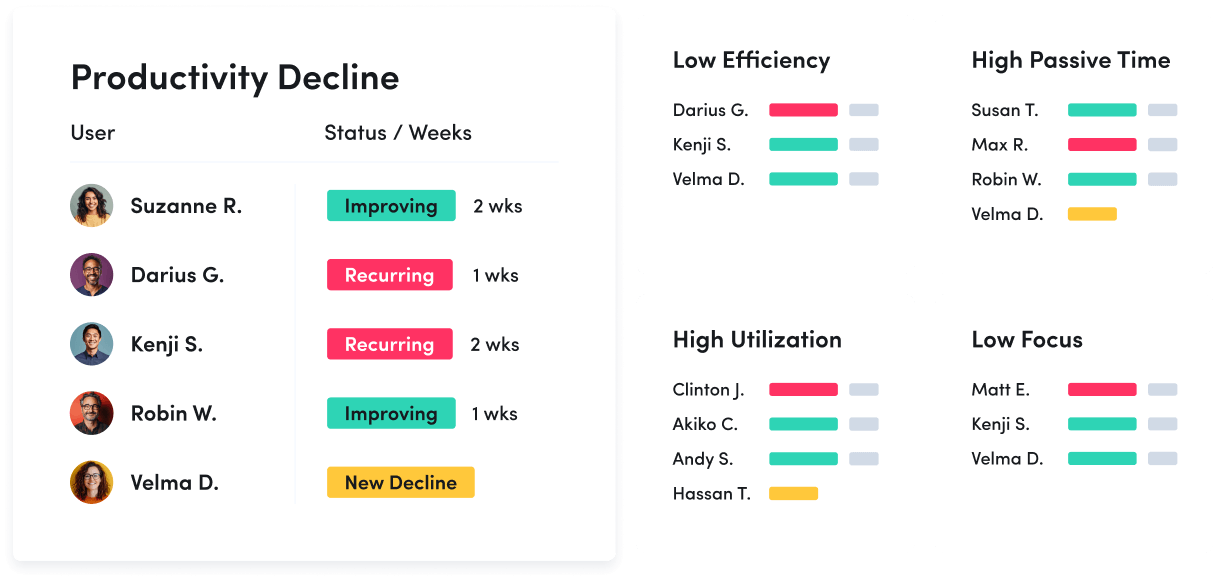
A productivity coaching dashboard showing user statuses: improving, recurring decline, and new decline. Four categories track low efficiency, high passive time, high utilization, and low focus, listing names with colored progress bars.
Explore performance optimization & coaching

Employee Engagement & Burnout

Employee Engagement & Burnout

Assess employee utilization to detect burnout and balance workloads.

A workload balance chart shows the status of 43 employees: 34 healthy, 7 underutilized, 2 over-utilized. Next to it, a profile for Suzzane R., Manager, shows expected hours as 7, actual hours as 5.1, and utilization at 73%.
Explore employee engagement & burnout

Workforce Planning

Workforce Optimization & Cost Savings

Workforce Optimization & Cost Savings

Uncover hidden inefficiences to cut costs and boost profitability.

Explore workforce optimization

Capacity & Headcount Planning

Capacity & Headcount Planning

Analyze workload capacity to allocate resources and identify staffing needs.

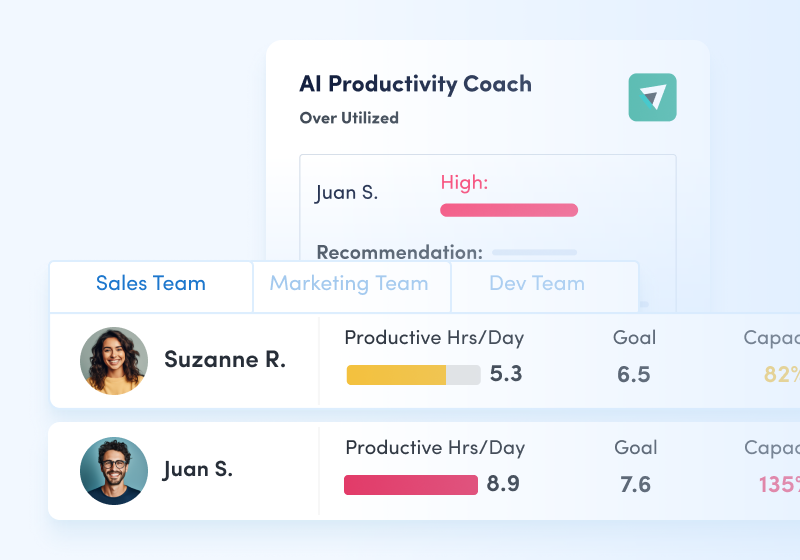
A workload balance comparison chart of four people with their productive hours per day, goals, capacity, and workload. Suzanne R. is under capacity, Juan S. is over capacity, and Darius G. and Akiko C. have data without capacity details.
Explore capacity & headcount planning

Technology Optimization

Technology Optimization

Track technology usage to identify unused licenses and cut unnecessary costs.

A chart shows tech application license data. Microsoft Teams: 38 active, 500 total, 7.6% usage, $83,160 savings; Salesforce: 96 active, 300 total, 32% usage, $146,860 savings; Zendesk: 71 active, 150 total, 47% usage, $61,620 savings. Microsoft Teams unused: 462.
Explore technology optimization

Office Space Planning

Office Space Planning

Right-size real estate investments with insight into office space utilization.

An office space planning view that shows office space usage. Austin office: 28% occupied, 415 desks unused, 120 occupied. Comparisons: San Francisco office uses 42%, New York 70%. Potential savings: Austin $74,340; San Francisco $135,780; New York $72,000.
Explore office space planning

Remote Workforce Management

Track employee productivity by work location to guide workplace policy decisions.

Location insights graph showing Productivity by Location with bars for Hybrid, Remote, Office. Below, a section for User with a photo and a table displaying productive hours: Paul 34 total, 10 hybrid, 6 remote, 18 in office. Entries for Jack and Linda are grayed out.
Explore workforce management

Employee Monitoring

Get real-time visibility into team activity and productivity levels.

Team pulse dashboard showing three productivity statuses: Out of Office (0%), Late to Work (73%), and High Productivity (92%). Timeline below highlights different productivity levels throughout the day.
Explore employee monitoring

Time Tracking & Auditing

Get detailed insight into employee work hours and locations, with time categorized as productive, unproductive or undefined.

Time tracking and auditing table showing user activity with a focus on Darius G., who is remote with only 6 minutes active time, flagged as an issue due to expected hours being 8.
Explore time tracking & auditing

Schedule & Policy Adherence

Monitor late starts, early departures and extended breaks in real time.

Schedule policy adherence bar chart showing attendance from 5/24 to 5/28. The categories are Compliant, Tardy, and Left Early. Compliant has the highest numbers, followed by Tardy and Left Early. Summary boxes above show totals: 52 Compliant, 12 Tardy, 16 Left Early.
Explore schedule & policy adherence

Contractor Billing Reconciliation

Confirm contractor hours billed match hours worked.

Explore billing reconciliation

Productivity Management

Make data-driven decisions to fuel productivity across teams and individuals.

A team productivity chart for three people: Suzanne R. (73% productive), Juan S. (65% productive), and Velma D. (84% productive). Time slots from 9 AM to 5 PM indicate levels of inactivity, productivity, and un-productivity
Explore productivity management

Performance Optimization & Coaching

Leverage AI-powered insights to understand and optimize team performance.

A productivity coaching dashboard showing user statuses: improving, recurring decline, and new decline. Four categories track low efficiency, high passive time, high utilization, and low focus, listing names with colored progress bars.
Explore performance optimization & coaching

Employee Engagement & Burnout

Assess employee utilization to detect burnout and balance workloads.

A workload balance chart shows the status of 43 employees: 34 healthy, 7 underutilized, 2 over-utilized. Next to it, a profile for Suzzane R., Manager, shows expected hours as 7, actual hours as 5.1, and utilization at 73%.
Explore employee engagement & burnout

Workforce Optimization & Cost Savings

Uncover hidden inefficiences to cut costs and boost profitability.

Explore workforce optimization

Capacity & Headcount Planning

Analyze workload capacity to allocate resources and identify staffing needs.

A workload balance comparison chart of four people with their productive hours per day, goals, capacity, and workload. Suzanne R. is under capacity, Juan S. is over capacity, and Darius G. and Akiko C. have data without capacity details.
Explore capacity & headcount planning

Technology Optimization

Track technology usage to identify unused licenses and cut unnecessary costs.

A chart shows tech application license data. Microsoft Teams: 38 active, 500 total, 7.6% usage, $83,160 savings; Salesforce: 96 active, 300 total, 32% usage, $146,860 savings; Zendesk: 71 active, 150 total, 47% usage, $61,620 savings. Microsoft Teams unused: 462.
Explore technology optimization

Office Space Planning

Right-size real estate investments with insight into office space utilization.

An office space planning view that shows office space usage. Austin office: 28% occupied, 415 desks unused, 120 occupied. Comparisons: San Francisco office uses 42%, New York 70%. Potential savings: Austin $74,340; San Francisco $135,780; New York $72,000.
Explore office space planning

ActivTrak fits your stack

Get deeper insights, integrate with any app.

Saleforce

Microsoft Teams logo.

Microsoft Teams

Slack

Slack

ServiceNow

Zendesk

Zoom

Microsoft Viva

lattice logo

Lattice

qualtrics logo

Qualtrics XM

jira logo

Jira Software

Workday

ADP

culture amp logo

Culture Amp

asana logo

Asana

How it works

Collect

Use the ActivTrak Agent to gather digital activity data about how employees work while safeguarding employee privacy.

Analyze

Assess productivity drivers, engagement levels and work habits through intuitive dashboards and AI-powered reports.

Optimize

Use ActivTrak Coach to improve productivity, performance and resource utilization for organizational health and well-being.

See what customers say about ActivTrak

Powered byThe words Trust Radius in blue text.

Getting started is easy. Be up and running in minutes.

Frequently asked questions about SaaS management

How do you measure software usage?

Increasing productivity is always top of mind for organizations and one key way to ensure an increase in productivity is tracking software usage. It can be difficult to measure whether or not your company is effectively using their technology stack and when done poorly, it can result in wasteful spending.

By measuring software usage you can identify areas of improvement, manage workloads across teams, reduce costs, and increase ROI. Be sure to track software renewals. By doing so, you keep a constant pulse to measure if that particular software application is really worth the money. Application usage tracking software can help you tie together spend data, renewal data and usage data to help optimize spend.

Also be sure to understand how many software licenses you have versus how many are actually being used. Often, shiny new software applications get introduced to the business and are forgotten about. Eliminate wasteful SaaS spending by identifying inactive accounts, unallocated or unused licenses, and software with overlapping features and functionality.

Always reevaluate your technology or software stack to understand if your employees find the software easy to use and helps them be more productive, assess reliability of the applications, and determine if each tool in your stack helps your company achieve business goals.

What is software utilization?

Software utilization is the data that is collected to help businesses optimize software license costs. Application usage tracking software collects and analyzes software usage data to keep the business informed of what software is really being used by individuals and teams.

Understanding software utilization helps you determine if software is being unused or underutilized, identify the unauthorized use of software to determine if it should be stopped, identify new opportunities for cost savings, support security and compliance efforts to minimize risk, and much more.

Getting started is easy. Be up and running in minutes.

Get started free Get started
Watch demo Watch demo